Citrix Secure Private Access
The Citrix Secure Private Access service enables the administrators to provide a cohesive experience integrating single sign-on, remote access, and out-of-band content inspection into a single solution for end-to-end access control. IT administrators can govern access to approved SaaS apps with a simplified single sign-on experience. With the Citrix Secure Private Access service, administrators can also protect the organization’s network and end user devices from malware and data leaks by filtering access to specific websites and website categories. Administrators can enforce enhanced access security policies for secure access to SaaS applications. Once authenticated, employees have access to all critical business applications from any device irrespective of whether they are in the office premises, at home, or traveling.
Administrators can monitor user activities, such as malicious, dangerous, or unknown websites visited, and the bandwidth consumed, and risky download and upload behaviors. Using the Analytics around websites and website categories accessed, administrators can take corrective action to protect the enterprise network. At the same time, the service provides end users seamless and secure access to all their hosted apps.
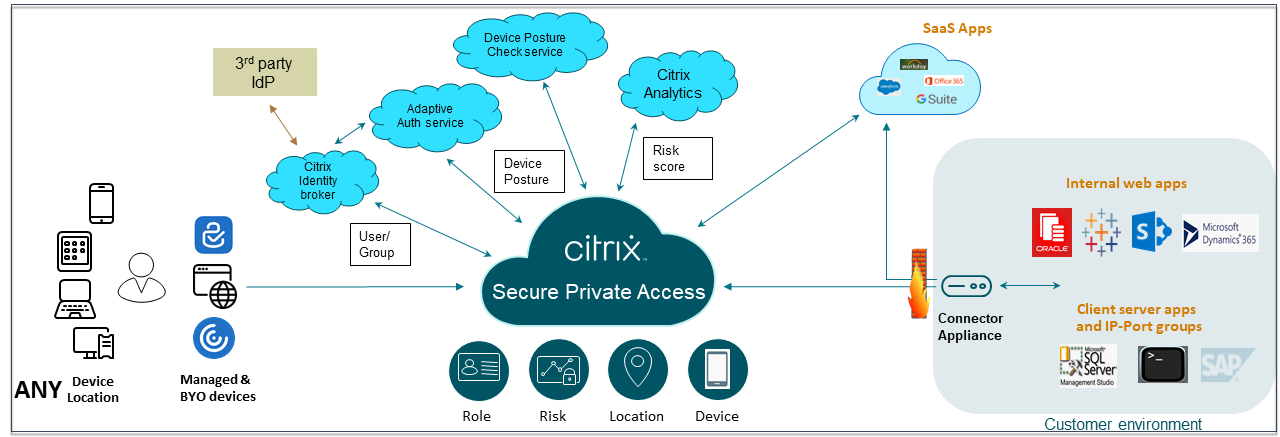
Key capabilities of Citrix Secure Private Access
Some of the key tasks that you can complete with the Citrix Secure Private Access service are:
- Publish SaaS apps with single sign-on access - Once the user is authenticated to Citrix Workspace™ with a primary identity, subsequent authentication challenges to SaaS and web apps are automatically fulfilled by the single sign-on feature in the Citrix Cloud™ using SAML assertions.
By default, the SAML assertion utilizes the email address associated with the user’s Active Directory account (identity provider) with the email address associated with the user’s SaaS or web app account (service provider).
-
Provide contextual access - Although an authorized SaaS app is considered safe, content in the SaaS app actually can be dangerous - constituting a security risk. When a user clicks a hyperlink within a SaaS app, the traffic is routed through the web filtering feature, which provides a risk assessment for the hyperlink. Based on the hyperlink’s risk assessment, and the customized list of URL categories, the web filtering feature allows, redirects, or denies the hyperlink request from the user as follows:
- Approved: The hyperlink is considered safe and the Chrome browser within the Workspace app accesses the hyperlink.
- Denied: The hyperlink is considered dangerous and access is denied.
- Redirected: The hyperlink request is redirected to the Remote Browser Isolation service, where the user’s internet browsing activities are isolated from the endpoint device, the corporate network, and the SaaS app.
-
Security and performance analytics - Users invariably access SaaS apps that have enhanced security inherent in them. The workspace app, the Secure Private Access service, and the Remote Browser Isolation service provide the Security analytics service with information about the following user and application behaviors. These analytics impact the user’s overall risk score:
- App launch time
- App end time
- Print action
- Clipboard access
- URL Access
- Data upload
- Data download
-
Web filtering: The web filtering feature evaluates the risk of each hyperlink selected within the SaaS application. Accessing these sites and monitoring changes in user behavior increases the user’s overall risk score because it signals the endpoint device is compromised and started to infect or encrypt data or the user and device are stealing intellectual property.
- Integration with Security Information and Event Management (SIEM) - The Secure Private Access logs can be exported via Kafka to SIEM such as Splunk, Sentinel, and Elastic. Exporting logs to SIEM enhances security capabilities and improves incident response effectiveness. For details, see Secure Private Access events.