Secure Private Access service solution overview
Traditional VPN solutions require end-user devices to be managed, provide access at the network level, and enforce static access control policies. Citrix Secure Private Access™ gives IT a set of security controls to protect against threats from BYO devices, giving users the choice to access their IT-sanctioned applications from any device, whether it’s managed or BYO.
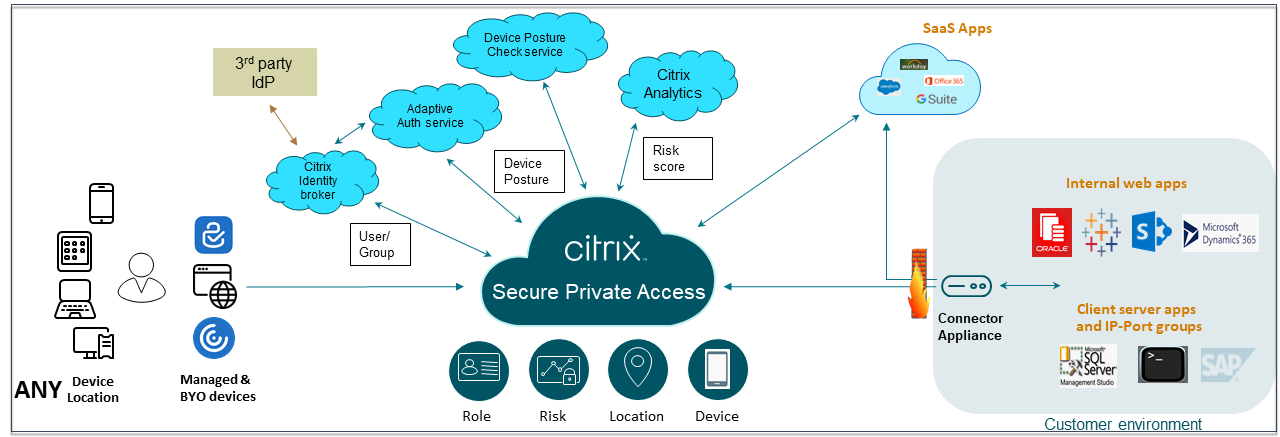
Citrix Secure Private Access offers Adaptive Authentication, single sign-on support, enhanced security controls for the applications. Secure Private Access also provides the capabilities to scan the end user device before establishing a session by using the Device Posture service. Based on the Adaptive Authentication or Device Posture results, admins can define the authentication methods for the apps.
Adaptive security
Adaptive Authentication determines the right authentication flow for the current request. Adaptive Authentication can identify the device posture, geographical location, network segment, user organization/department membership. Based on the information obtained, an admin can define how they want to authenticate users to their IT sanctioned apps. This allows organizations to implement the same authentication policy framework across every resource including public SaaS apps, private web apps, private client-server apps, and Desktops as a Service (DaaS). For details, see Adaptive Security.
Application access
Secure Private Access can create a connection to the on-premises web apps without relying on a VPN. This VPN-less connection uses an on-premises deployed Connector Appliance. The Connector Appliance creates an outbound control channel to the organization’s Citrix Cloud subscription. From there, Secure Private Access can tunnel connections to the internal web apps without the need for a VPN. For details, see Application Access.
Single sign-on
With Adaptive Authentication, organizations can provide strong authentication policies to help reduce the risk of compromised user accounts. The single sign-on capabilities of Secure Private Access use the same Adaptive Authentication policies for all SaaS, private web, and client-server apps. For details, see Single Sign-On.
Browser security
Secure Private Access is integrated with Google Chrome Enterprise Premium (CEP), which includes features such as data loss prevention (DLP), malware and phishing protection, and URL filtering. The Google Chrome browser running locally on the client machine acts as a secure browser with per user level policy enforcement via Chrome managed profiles. For details, see Integration with Google Chrome Enterprise Premium.
Device posture
Device posture service allows an admin to define policies to check the posture of endpoint devices trying to access corporate resources remotely. Based on the compliance status of an endpoint, the device posture service can deny access or provide restricted/full access to corporate applications and desktops.
When an end user initiates a connection from their store, the Device Posture client collects information about the endpoint parameters and shares this information with the Device Posture service to determine if the posture of the endpoint meets policy requirements.
The integration of the Device Posture service with Citrix Secure Private Access enables secure access to SaaS, Web, TCP and UDP apps from anywhere, delivered with the resiliency and scalability of Citrix Cloud. For details, see Device Posture.
Support for TCP and UDP applications
Sometimes remote users need access to private client-server apps that have their front-end on the endpoint and their back-end in a data center. Organizations can rightfully enforce strict security policies around these internal and private apps, making it difficult for remote users to access these applications without compromising security protocols.
Secure Private Access service addresses the TCP and UDP security vulnerabilities by enabling ZTNA to deliver secure access to these apps. Users can now access all private apps including TCP, UDP, and HTTPS apps either using the Chrome browser or a native client application via the Citrix Secure Access™ client running on their machines.
Users must install the Citrix Secure Access client on their client devices.
- For Windows, the client version (22.3.1.5 and later) can be downloaded from https://www.citrix.com/downloads/citrix-secure-access/.
- For macOS, the client version (22.02.3 and later) can be downloaded from the App Store.
For details, see Support for client-server apps.
Sample use cases
- Access internal applications (Web/TCP/UDP) using a Zero-Trust approach without opening incoming traffic on the firewall
- Move to a Zero-Trust approach by discovering applications accessed by users
- Restrict access to SaaS applications to company-owned public IP addresses
- Enhanced Security to Azure-managed SaaS Apps
- Enhanced Security to Office 365
- Enhanced Security to Okta Apps
Reference articles
- Introduction to Secure Private Access
- Tech brief
- Reference Architecture
- Secure Private Access onboarding and set up
Reference videos
- Zero trust network access (ZTNA) to apps
- Private Web app access with Citrix Secure Private Access
- Public SaaS app access with Citrix Secure Private Access
- Private client-server app access with Citrix Secure Private Access
- Keylogger Protection with Citrix Secure Private Access
- Screen sharing protection with Citrix Secure Private Access
- End-user experience with Citrix Secure Private Access
- ZTNA versus VPN logon experience with Citrix Secure Private Access
- ZTNA versus VPN port scans with Citrix Secure Private Access
What’s new in related products
- Citrix StoreFront Cloud: What’s new
- Citrix DaaS: What’s new
- Citrix Secure Access: Citrix Secure Access