Microsoft Entra ID
Support for Microsoft Entra ID and Intune allows Citrix DaaS Flex to extend identity, access, and device management capabilities, helping organizations improve security posture, support compliance requirements, and streamline the end-user experience. Combining this functionality with Microsoft Entra single sign-on provides users with a seamless experience.
Configure Microsoft Entra ID identity
Create an Entra ID App Registration
- In your Azure portal, navigate to Entra ID > App registration > New registration.
-
Register a new application.
Note:
The Azure administrator must have multifactor authentication configured.
-
On the overview page, copy and save the following values:
- Application (client) ID
- Directory (tenant) ID
- In the left sidebar, click Certificates & Secrets > New client secret.
-
Fill in the Description field and choose an expiration duration for the client secret.
Note:
You will be prompted for this expiration date in a later step within the Citrix console.
- Immediately copy the Value column. This is your client secret and is only shown once.
- In the left sidebar, click API permissions > Add a permission > Microsoft Graph > Application permissions.
-
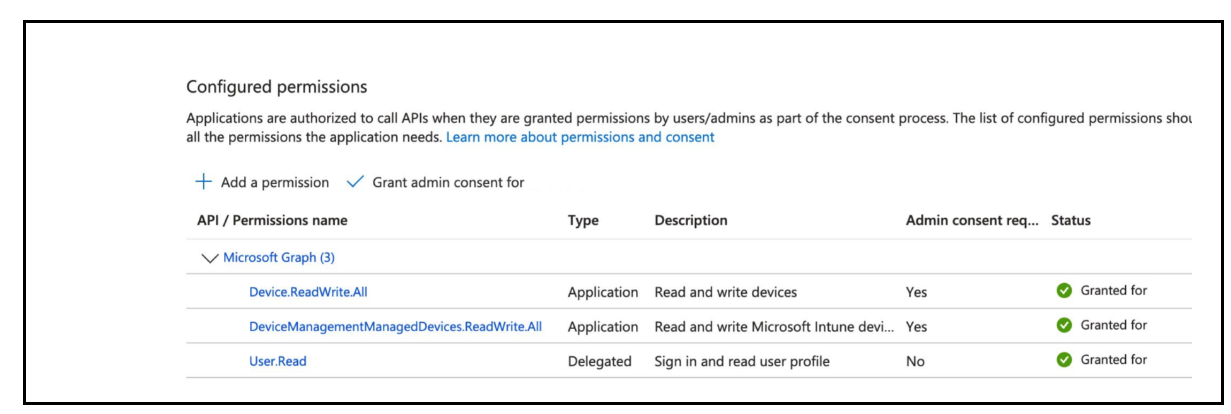
Search for and select the following permissions:
-
Device.ReadWrite.All— required for Entra ID registration -
DeviceManagementManagedDevices.ReadWrite.All— required for Intune device enrollment
-
- Click Add permissions.
-
On the API permissions page, click Grant admin consent for
<tenant name>, then click Yes to confirm.Note:
Verify that both permissions show a green checkmark under the Status column.
Create a Service Account
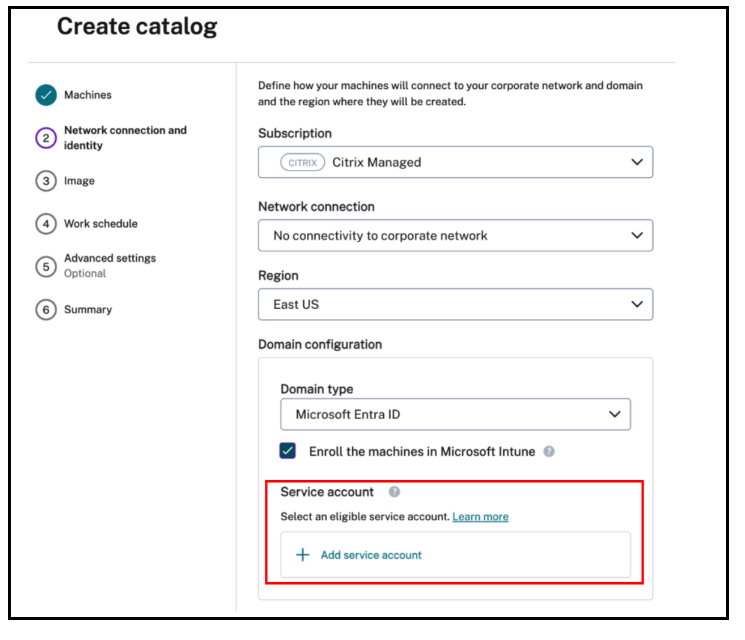
During the Create catalog workflow, a Microsoft Entra ID service account is required. For more information, see Azure AD service accounts.
Enable Entra ID Single Sign-On
Microsoft Entra ID Single Sign-On (SSO) allows users to authenticate once using their Entra ID credentials and gain seamless access to virtual applications and desktops without being prompted to sign in again. SSO is supported for session hosts that are Microsoft Entra joined or Microsoft Entra hybrid joined.
For more information on configuration, see Enable Entra ID SSO for virtual apps and desktops.