Technical security overview
The following diagram shows the components in a Citrix DaaS Flex deployment. This example uses a virtual network peering connection.
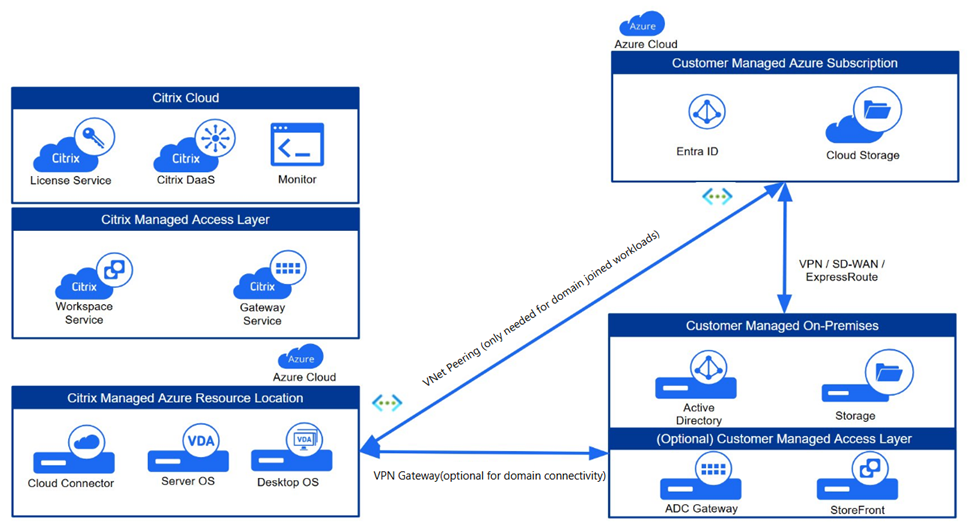
With Citrix DaaS Flex, the customer’s Virtual Delivery Agents (VDAs) that deliver desktops and apps, plus Citrix Cloud Connectors, are deployed into an Azure subscription and tenant that Citrix manages.
Citrix® responsibility
Citrix is responsible for the security of the Azure subscription and Microsoft Entra that are created for your environment. Citrix ensures tenant isolation, so each customer has their own Azure subscription, and cross-talk between different tenants is prevented.
Governance, risk, and compliance
Citrix maintains a comprehensive security program designed to meet the stringent requirements of global enterprises. For a list of Citrix information security and other certifications, see Citrix Trust Center.
- SOC 2 Type 2: Processes are independently audited to validate that effective security controls are in place.
- ISO/IEC 27001: Validates that data is managed and protected in accordance with international information security standards.
- ISO/IEC 27701: Builds on 27001 certification to validate the management of privacy and the processing of Personally Identifiable Information (PII).
- Health Insurance Portability and Accountability Act (HIPAA): Supports the customer implementation of the technical safeguards required by the HIPAA Security Rule for protecting ePHI.
- Payment Card Industry Data Security Standard (PCI DSS): Supports the customer implementation of the technical safeguards required by PCI DSS.
Customer data is stored within the customer-selected Azure region. Compute, storage, and data processing of workloads deployed through Citrix DaaS Flex remain within the chosen geography to help customers meet their data sovereignty requirements.
Regions
| Geography/continent | Available regions |
|---|---|
| North America (US) | Central US; East US; North Central US; South Central US; West US; West US 2; West US 3 |
| South America | Brazil South |
| Europe | Germany West Central; Italy North; North Europe; Sweden Central; UK South; West Europe |
| Asia | Central India; Japan East; Southeast Asia |
| Australia / Oceania | Australia East |
Identity and Access Management (IAM)
Secure access is managed through robust identity controls for both customer Citrix administrators.
- Citrix Administrative Access: Access to your subscription is restricted to specific Citrix personnel based on the job function and operational responsibilities. Strict internal security policies govern the use of this access. Citrix personnel cannot access VDAs in a customer-managed subscription.
Network architecture
Citrix-managed virtual network
Citrix designs the network architecture for strict tenant isolation and secure connectivity. Virtual networks are created for isolating resource locations within your Citrix-managed Azure subscription. Within those networks, Citrix creates the VDAs, Cloud Connectors, image builder machines, storage accounts, key vaults, and other Azure resources.
Citrix configures the default Azure network security groups to limit access to network interfaces in virtual network peering connections. Generally, this controls incoming traffic to VDAs and Cloud Connectors. Customers cannot change this default firewall policy, but might deploy additional firewall rules on Citrix-created VDAs, for example, to partially restrict outgoing traffic. Customers who install virtual private network clients, or other software capable of bypassing firewall rules, on Citrix-created VDA machines are responsible for any security risks that might result.
For more information regarding firewall policies, see Firewall policy for Citrix DaaS Flex.
Azure virtual network peering
For VDAs in a Citrix-managed Azure subscription to contact on-premises domain controllers, file shares, or other intranet resources, a virtual network peering connection can be implemented. The customer’s Citrix-managed virtual network is peered with a customer-managed Azure virtual network. The customer-managed virtual network might enable connectivity with the customer’s on-premises resources using the cloud-to-on-premises connectivity solution of the customer’s choice, such as Azure ExpressRoute or IPsec tunnels.
Citrix’s responsibility for virtual network peering is limited to supporting the peering workflow and related Azure resource configuration for establishing a peering relationship between Citrix and customer-managed virtual networks.
Resiliency
The Citrix DaaS Flex solution is designed in accordance with Citrix leading practices for high availability and resiliency.
- Availability zones: Citrix distributes Cloud Connectors and VDAs across availability zones if offered by the Azure region to protect against localized data center failures.
- Backup VM SKUs: Citrix designates backup Azure VM SKUs to protect against issues in which capacity is unavailable for the VM SKU of the catalog. If the SKU of the catalog is unavailable due to capacity constraints, the service automatically falls back to a secondary VM SKU.
- Local Host Cache and Service Continuity: Citrix has resiliency solutions that can provide end-user access to applications and desktops if Cloud Connectors lose connectivity with Citrix Cloud due to an outage or network communication issue.
- Disaster Recovery: In the event of Azure data loss, Citrix recovers as many resources in the Citrix-managed Azure subscription as possible. Citrix attempts to recover the Cloud Connectors and VDAs. If Citrix is unable to recover these items, customers are responsible for creating a new catalog. Citrix assumes that machine images are backed up and that customers have backed up their user profiles, allowing the catalog to be rebuilt.
-
Catalog resiliency: Resiliency differs for different deployment models:
- Static (user is assigned to a single VDA): If a user’s VDA goes down, they must be placed on a new one to recover. Azure provides a 99.5% SLA for single-instance VMs with standard SSDs. The customer can still back up the user profile, but any customizations made to the VDA (such as installing programs or configuring Windows) are lost. Administrators can take scheduled or manual snapshots of static machines.
- Random (user is assigned randomly to a VDA at launch time): This catalog type provides high availability by redundancy. If a VDA goes down, no information is lost because the user’s profile resides elsewhere.
Customer responsibility
VDAs and images
The customer is responsible for all aspects of the software installed on VDA machines, including:
- Operating system updates and security patches
- Antivirus and antimalware
- VDA software updates and security patches
- Additional software firewall rules (especially outbound traffic)
- Follow Citrix security considerations and best practices.
Citrix provides a prepared image that is intended as a starting point. Customers can use this image for proof-of-concept or demonstration purposes or as a base for building their own machine image. Citrix does not guarantee the security of this prepared image. Citrix makes an attempt to keep the operating system and VDA software on the prepared image up to date, and enables Windows Defender on these images.
Virtual network peering
The customer must open all ports specified in the Firewall policy for Citrix DaaS Flex.
When virtual network peering is configured, the customer is responsible for the security of their own virtual network and its connectivity to their on-premises resources. The customer is also responsible for the security of the incoming traffic from the Citrix-managed peered virtual network. Citrix does not take any action to block traffic from the Citrix-managed virtual network to the customer’s on-premises resources.
Customers have the following options for restricting incoming traffic:
- Give the Citrix-managed virtual network an IP block which is not in use elsewhere in the customer’s on-premises network or the customer-managed connected virtual network. This is required for virtual network peering.
- Add Azure network security groups and firewalls to the customer’s virtual network and on-premises network to block or restrict traffic from the Citrix-managed IP block.
- Deploy measures such as intrusion prevention systems, software firewalls, and behavioral analytics engines in the customer’s virtual network and on-premises network, targeting the Citrix-managed IP block.
Proxy
The customer might choose whether to use a proxy for outbound traffic from the VDA. If a proxy is used, the customer is responsible for:
- Configuring the proxy settings on the VDA machine image or, if the VDA is joined to a domain, using Active Directory Group Policy.
- Maintenance and security of the proxy.
- Proxies are not allowed for use with Citrix Cloud Connectors or other Citrix-managed infrastructure.
Identity and access management (IAM)
Secure access is managed through robust identity controls for both customer end-users.
-
Customer Identity: Citrix DaaS Flex seamlessly integrates with the identity provider (IdP) configured for Citrix Cloud. See Identity and access management to learn more.
- For IdPs other than Active Directory, you can enable seamless Single Sign-On (SSO) to VDAs by Enabling single sign-on for workspaces with Citrix Federated Authentication Service (FAS).
- Citrix Cloud provides Conditional Authentication and Device Posture capabilities to enhance the security posture of your environment.
Citrix and customer shared responsibilities
Citrix Cloud Connector for domain-joined catalogs
Citrix DaaS Flex deploys Cloud Connectors in each resource location. Some catalogs might share a resource location if they are in the same region, virtual network peering, and domain as other catalogs for the same customer. Citrix configures the customer’s domain-joined Cloud Connectors for the following default security settings on the image:
- Operating system updates and security patches
- Antivirus software
- Cloud Connector software updates
Customers don’t always have access to the Cloud Connectors. However, they might acquire access by using catalog troubleshooting steps and logging in with domain credentials. The customer is responsible for any changes they make when logging in through the bastion.
Customers also have control over the domain-joined Cloud Connectors through the Active Directory Group Policy. The customer is responsible for ensuring that the group policies that apply to the Cloud Connector are safe and sensible. For example, if the customer chooses to disable operating system updates using Group Policy, the customer is responsible for performing operating system updates on the Cloud Connectors. The customer can also choose to use Group Policy to enforce stricter security than the Cloud Connector defaults, such as by installing a different antivirus software.
Troubleshooting
With either bastions or RDP access, the active user performing the operation is responsible for the security of the machines that are being accessed. If the customer accesses the VDA or Cloud Connector through RDP, any issues that occur are the responsibility of the customer.
Citrix does not create bastions in the customer’s Citrix-managed virtual network within the customer’s Citrix-managed subscription. The customer is responsible for creating bastions to diagnose and repair issues. The bastion is a machine that the customer can access through RDP and then use to access the VDAs and (for domain-joined catalogs) Cloud Connectors through RDP to gather logs, restart services, or perform other administrative tasks. By default, creating a bastion opens an external firewall rule to allow RDP traffic from a customer-specified range of IP addresses to the bastion machine. It also opens an internal firewall rule to allow access to the Cloud Connectors and VDAs through RDP.
Bastion host
The customer is responsible for providing a strong password used for the local Windows account on the bastion machine. The customer is also responsible for providing an external IP address range that allows RDP access to the bastion. The customer is also responsible for deleting the bastion after troubleshooting is complete. Citrix automatically shuts down the machine and closes the port eight (8) hours after it is powered on. However, Citrix never automatically deletes a bastion. If the customer chooses to use the bastion for an extended period of time, they are responsible for patching and updating it. Citrix recommends that a bastion be used only for three days before deleting it. If the customer wants an up-to-date bastion, they can delete their current one and then create a new bastion, which will provision a fresh machine with the latest security patches.
RDP access
For domain-joined catalogs, if the customer’s virtual network peering is functional, the customer can enable RDP access from their peered virtual network to their Citrix-managed virtual network. If the customer uses this option, they are responsible for accessing the VDAs and Cloud Connectors over the virtual network peer. Source IP address ranges can be specified so RDP access can be restricted further, even within the customer’s internal network. The customer needs to use domain credentials to log in to these machines. Citrix recommends that customers disable RDP access once issues are resolved to improve the security posture of the environment.
Domain credentials
If the customer elects to use a domain-joined catalog, the customer is responsible for providing a domain account (username and password) with permissions to join machines to the domain. When supplying domain credentials, the customer is responsible for adhering to the following security principles:
- Auditable: The account must be created specifically for Citrix DaaS Flex to facilitate easy auditing of its usage.
- Scoped: The account requires only permissions to join machines to a domain. It must not be a full domain administrator.
- Secure: A strong password must be placed on the account.
Citrix is responsible for the secure storage of this domain account in an Azure Key Vault in the customer’s Citrix DaaS Flex subscription. The account is retrieved only if an operation requires the domain account password.
More information
For related information, see:
- Secure Deployment Guide for the Citrix Cloud Platform: Security information for the Citrix Cloud platform.
- Technical security overview: Security information for the Citrix DaaS.
- Third-party notifications