Citrix DaaS Flex for Azure
Architecture overview
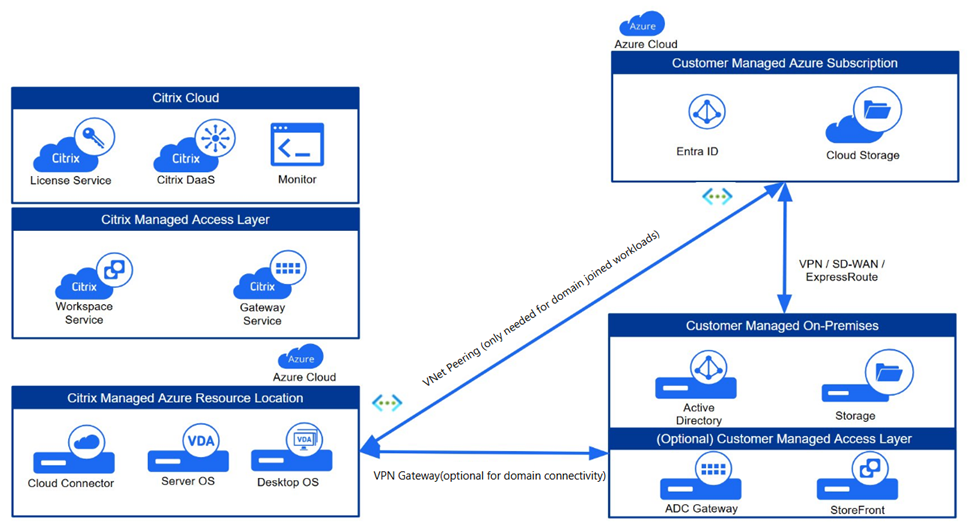
Machine identity
VDAs in a Citrix DaaS Flex subscription can be:
- Non-domain joined
- Active Directory joined
- Microsoft Entra hybrid joined
- Microsoft Entra ID joined
The following table outlines the availability of the machine identity based on delivery model and network connectivity:
| Single-session vs Multi-session | Persistent vs Non-persistent | Non-domain joined | Active Directory joined | Entra hybrid joined | Entra ID joined |
|---|---|---|---|---|---|
| With network connectivity | |||||
| Multi-session | Persistent | Yes | Yes | Yes | Yes |
| Multi-session | Non-persistent | Yes | Yes | Yes | Yes |
| Single-session | Persistent | Yes | Yes | Yes | Yes |
| Single-session | Non-persistent | Yes | Yes | Yes | Yes |
| Without network connectivity | |||||
| Multi-session | Persistent | Yes | No | No | Yes |
| Multi-session | Non-persistent | Yes | No | No | Yes |
| Single-session | Persistent | Yes | No | No | Yes |
| Single-session | Non-persistent | Yes | No | No | Yes |
Note:
Intune enrollment is only supported for persistent workloads.
Non-domain-joined
Non-domain-joined VDAs are ideal for situations in which VDAs do not require direct connectivity to Active Directory or application data residing in your corporate network. While non-domain-joined VDAs can improve security by isolating VDAs from Active Directory, they lose the ability to authenticate to internal applications using Kerberos authentication. Additionally, Group Policy Objects (GPOs) cannot be configured centrally through Active Directory when using non-domain-joined machines. Administrators cannot connect directly to non-domain-joined VDAs through a bastion machine or RDP. Citrix Profile Management is not supported for non-domain-joined catalogs, so it is recommended that non-domain-joined VDAs be persistent and static
Active Directory domain-joined
Integrating VDAs with Active Directory unlocks key operational capabilities, including centralized management through GPOs and secure network authentication using Kerberos.
Active Directory domain-joined VDAs require network connectivity between the Citrix DaaS Flex subscription and the Domain Controllers.
When Citrix Workspace or StoreFront is configured to use an authentication method other than Active Directory or Entra ID, a seamless single sign-on experience requires the implementation of the Federated Authentication Service (FAS).
Microsoft Entra hybrid joined
Joining Citrix VDAs to both Active Directory and Microsoft Entra provides users with seamless single sign-on (SSO) to all company resources, from legacy on-premise applications to modern cloud services like Microsoft 365. This hybrid strategy allows you to continue using established Group Policy management while layering on powerful cloud security like Conditional Access and MFA.
Network connectivity to Active Directory is required to hybrid-join VDAs. SCCM co-management is required if VDAs are also enrolled in Intune. See Hybrid Azure AD joined catalogs enrolled in Microsoft Intune for more information regarding hybrid joined VDAs and Intune.
Microsoft Entra ID joined
Adding VDAs to a Microsoft Entra tenant can enhance security and user experience in your environment. Joining VDAs to your Microsoft Entra tenant requires the following prerequisites:
-
Entra ID Authentication
-
VDA version 2511
-
Microsoft Entra Service Account with
Device.ReadWrite.Allor equivalent role-based permissions
-
-
Intune Device Enrollment (Optional)
-
VDA version 2603
-
Device Management Service Account with
DeviceManagementManagedDevices.ReadWrite.Allpermissions
-
Note:
Adding VDAs to your Microsoft Entra tenant does not require network connectivity between your VDAs and your network.
Intune enrollment
Microsoft Entra ID or Microsoft Entra hybrid joined VDAs can be enrolled in Intune for enhanced security and application management. Microsoft Intune provides more information regarding Intune enrollment.
Citrix DaaS Flex requires a minimum of VDA Version 2603 or higher for Intune Enrollment, which is supported only for single-session persistent Windows 11 VDAs and not for multi-session VDAs.
User authentication
Citrix DaaS Flex integrates with the user identity configured in Citrix Cloud. Identity providers provides a complete list of supported identity providers.
If using an identity provider other than Active Directory or Microsoft Entra, Federated Authentication Service (FAS) is required to provide seamless single sign-on to the VDAs.
Access
Citrix DaaS Flex VDAs can be accessed through two primary methods:
- Citrix Workspace
- On-premises Citrix StoreFront
Each of these access layers can be integrated with either an on-premises Citrix Gateway or the cloud-based Citrix Gateway service for secure remote connections. Key differences include:
- Citrix Workspace: Provides the simplicity and ease of management inherent in a cloud service, offering a modern, unified user experience.
- On-premises Citrix StoreFront: Delivers extensive customization options, allowing you to tailor the user interface and overall solution to meet specific branding and functional requirements.
Both platforms offer robust mechanisms for business continuity:
- Workspace with Gateway Service: Features built-in Service Continuity, ensuring users can maintain access to their apps and desktops even during a cloud service or connectivity disruption.
- StoreFront: Utilizes Local Host Cache (LHC), which enables users to continue accessing resources if the on-premises deployment loses its connection to the Citrix Cloud control plane.
Management interfaces
Citrix DaaS Flex for Azure has two graphical management interfaces:
- Quick Deploy
- Web Studio
Quick Deploy: For Citrix DaaS Flex deployments, Quick Deploy serves as the primary management interface. You can access it by navigating to Quick Deploy > Microsoft Azure within the Citrix DaaS console.
Web Studio: The DaaS Web Studio configuration interface is the main DaaS management interface. While most catalog creation and management activities must be done through the Quick Deploy interface, some additional capabilities are offered through the Web Studio interface.
Refer to the Differences between Quick Deploy and Studio workflows for more details on use cases for Studio interface (for example: bulk maintenance mode).
When you create a catalog in Quick Deploy, an associated machine catalog, delivery group, and host connection are created automatically in the DaaS Studio.
Manage catalogs created in the Quick Deploy interface
When you create a catalog in Quick Deploy, that catalog (plus the delivery group and hosting connection that are created automatically behind the scenes) is assigned a scope of Citrix-managed object. Scopes are used in delegated administration to group objects.
Machine catalogs, delivery groups, and connections with the Citrix managed object scope are prohibited from certain actions in the Studio interface. In the Studio interface:
- Delivery group: Most of the delivery group management actions are available, however you cannot delete the delivery group.
- Machine catalog: Operations are locked down and only few are available like power actions and maintenance mode.
- Hosting connection: Operations are locked down and only few are available like power actions and
Set-HypHypervisorConnectionMetadata. You cannot create a connection that is based on a connection that has the Citrix managed object scope.
When you’re ready, get started.