This content has been machine translated dynamically.
Dieser Inhalt ist eine maschinelle Übersetzung, die dynamisch erstellt wurde. (Haftungsausschluss)
Cet article a été traduit automatiquement de manière dynamique. (Clause de non responsabilité)
Este artículo lo ha traducido una máquina de forma dinámica. (Aviso legal)
此内容已经过机器动态翻译。 放弃
このコンテンツは動的に機械翻訳されています。免責事項
이 콘텐츠는 동적으로 기계 번역되었습니다. 책임 부인
Este texto foi traduzido automaticamente. (Aviso legal)
Questo contenuto è stato tradotto dinamicamente con traduzione automatica.(Esclusione di responsabilità))
This article has been machine translated.
Dieser Artikel wurde maschinell übersetzt. (Haftungsausschluss)
Ce article a été traduit automatiquement. (Clause de non responsabilité)
Este artículo ha sido traducido automáticamente. (Aviso legal)
この記事は機械翻訳されています.免責事項
이 기사는 기계 번역되었습니다.책임 부인
Este artigo foi traduzido automaticamente.(Aviso legal)
这篇文章已经过机器翻译.放弃
Questo articolo è stato tradotto automaticamente.(Esclusione di responsabilità))
Translation failed!
使用元数据文件模式创建 SAML 连接
元数据文件模式与元数据 URL 模式有何不同?
本地 SAML IdP(例如 ADFS 或 PingFederate 服务器)可能存在限制,阻止公共访问其 SAML 元数据 URL 端点,因此无法使用元数据 URL 模式。如果 Citrix Cloud 管理员获得从 SAML IdP 导出的 metadata.xml 文件,他们仍然可以从 Citrix Cloud SAML 连接的自动配置中受益。Citrix Cloud 管理员仍然可以在 SAML 连接创建向导中上传此文件。
元数据文件模式为何不如元数据 URL 模式有用?
元数据文件模式是存储在 Citrix Cloud 中的静态配置。使用元数据文件模式创建的 Citrix Cloud SAML 连接在上传到 Citrix Cloud 后,无法检测 SAML 应用程序中的更改。
元数据 URL 模式是按需获取的动态配置。元数据 URL 模式会持续轮询您的 SAML IdP,并能在 SAML 应用程序配置中进行更改后立即检测到这些更改。
使用 IdP 元数据文件配置 Citrix Cloud SAML 连接
-
从您希望在 Citrix Cloud 中配置为新 SAML IdP 连接的 SAML 应用程序下载 metadata.xml 文件。
-
将文件保存到磁盘为
<filename>.xml,并且不要对其 XML 格式或内容进行任何更改。建议您使用从 SAML IdP 导出后直接获取的、完全未更改且未格式化的 metadata.xml 文件。重要提示:
metadata.xml 文件通常由 IdP 签名以防止篡改。对 metadata.xml 中数据进行的任何更改,例如使用 XML 美化工具重新格式化,都将使嵌入式签名失效,并导致 metadata.xml 上传和解析失败。
-
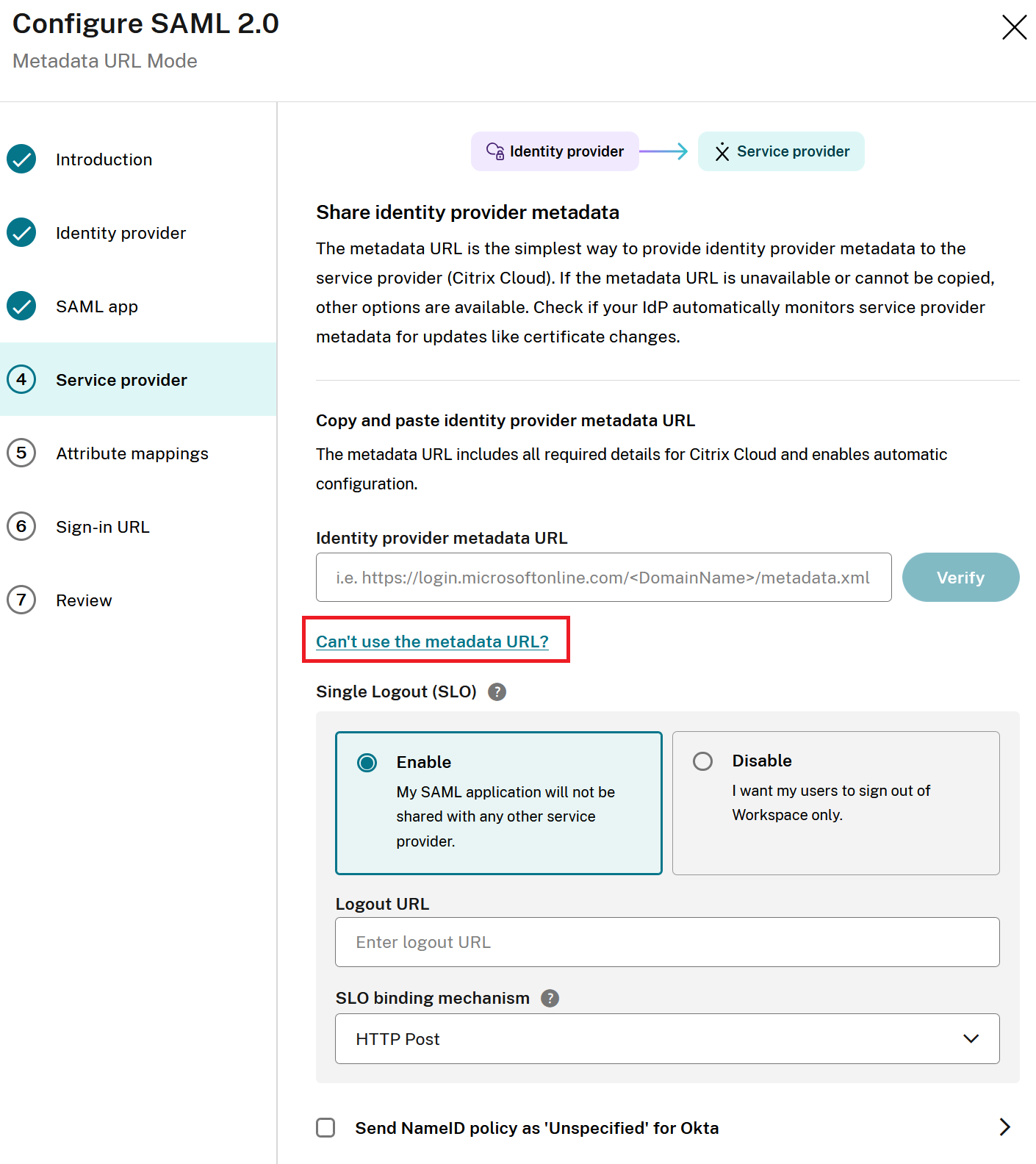
当您到达 SAML 向导的第 4 节 服务提供商部分时,选择 无法使用元数据 URL?。
-
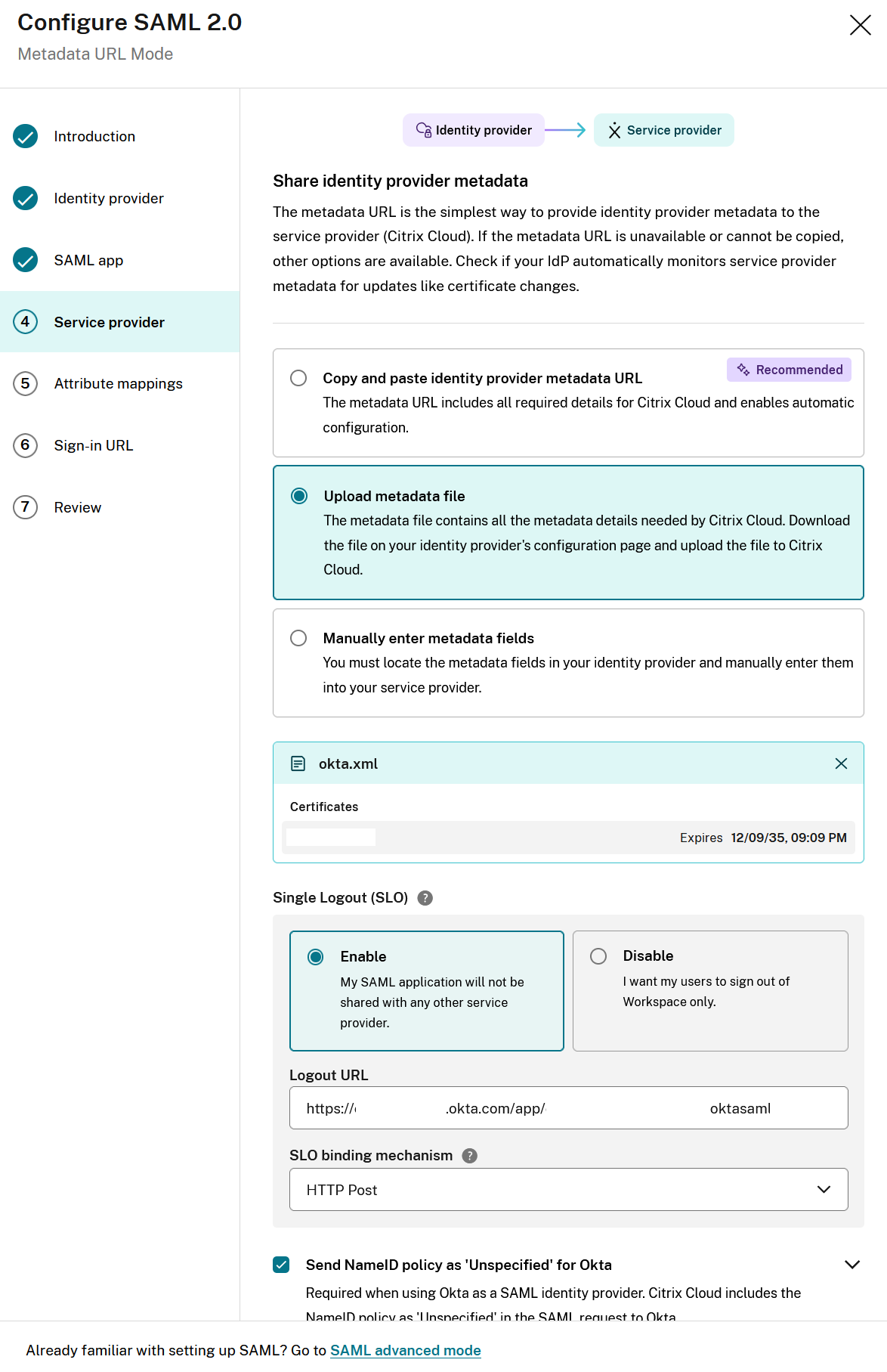
选择“上传元数据文件”,然后将 metadata.xml 文件拖放到文件上传对话框中,或浏览到磁盘上的 metadata.xml 文件。
以下是成功导入元数据文件的 Okta 示例。
-
通过启用或禁用 SLO 来配置所需的 SAML 注销行为。
有关 注销注意事项,请参阅这篇深入文章。 -
仅限 Okta SAML 连接。如果元数据文件包含 SSO 端点和包含“okta”的 DNS 域字符串,则将自动启用将 NameID 策略作为未指定发送给 Okta。使用 Okta 自定义域(例如 mytenant.domain.com)的 Okta SAML 应用程序无法自动检测,Citrix 管理员必须通过单击复选框手动启用将 NameID 策略作为未指定发送给 Okta。
-
接受默认属性映射。
-
配置您的 Citrix Cloud 管理员登录 URL。
-
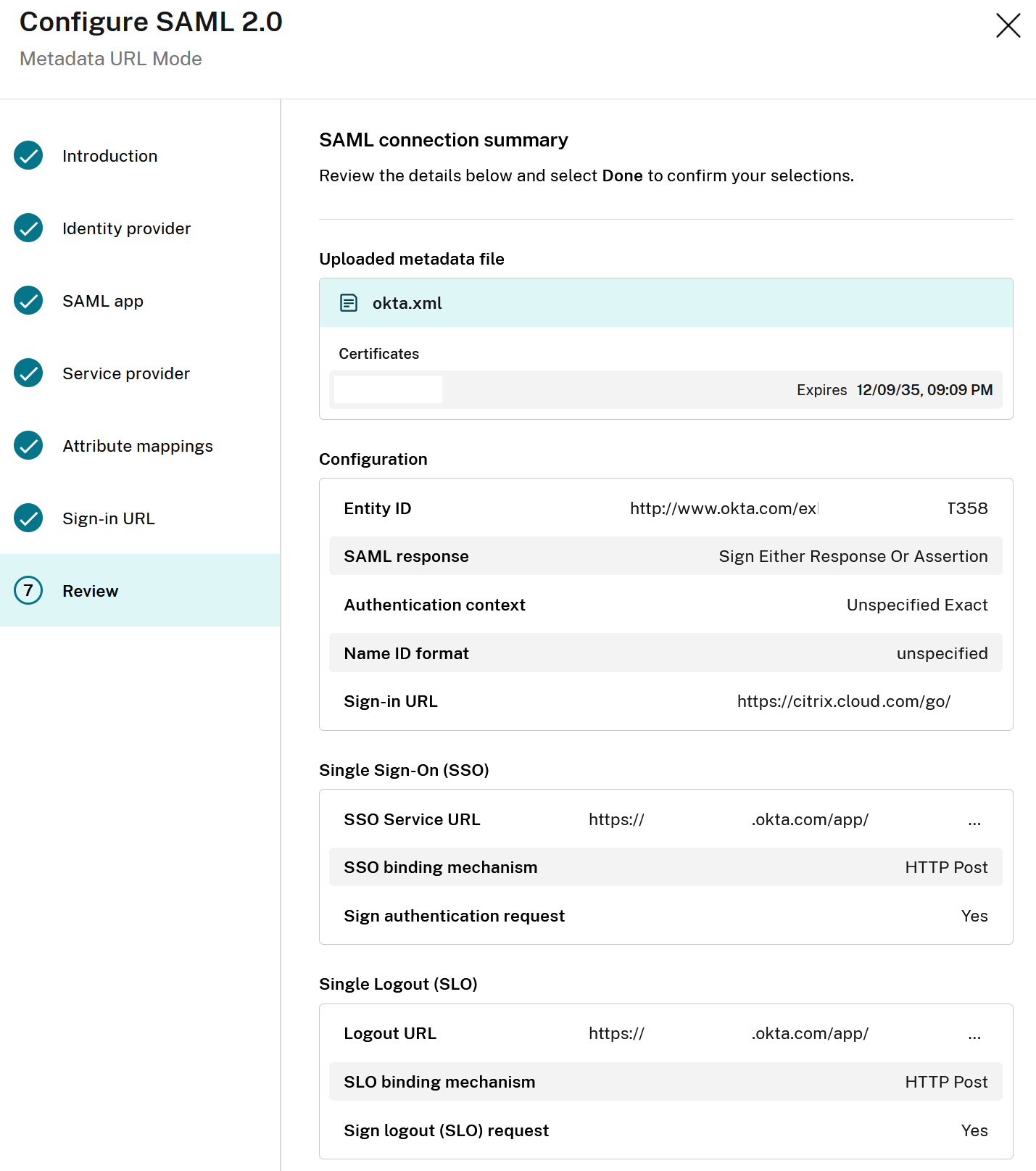
检查“审核”部分中的 SAML 向导摘要,并验证在解析 IdP 元数据文件后 SAML 配置是否符合您的预期。
共享
共享
This Preview product documentation is Citrix Confidential.
You agree to hold this documentation confidential pursuant to the terms of your Citrix Beta/Tech Preview Agreement.
The development, release and timing of any features or functionality described in the Preview documentation remains at our sole discretion and are subject to change without notice or consultation.
The documentation is for informational purposes only and is not a commitment, promise or legal obligation to deliver any material, code or functionality and should not be relied upon in making Citrix product purchase decisions.
If you do not agree, select I DO NOT AGREE to exit.