This content has been machine translated dynamically.
Dieser Inhalt ist eine maschinelle Übersetzung, die dynamisch erstellt wurde. (Haftungsausschluss)
Cet article a été traduit automatiquement de manière dynamique. (Clause de non responsabilité)
Este artículo lo ha traducido una máquina de forma dinámica. (Aviso legal)
此内容已经过机器动态翻译。 放弃
このコンテンツは動的に機械翻訳されています。免責事項
이 콘텐츠는 동적으로 기계 번역되었습니다. 책임 부인
Este texto foi traduzido automaticamente. (Aviso legal)
Questo contenuto è stato tradotto dinamicamente con traduzione automatica.(Esclusione di responsabilità))
This article has been machine translated.
Dieser Artikel wurde maschinell übersetzt. (Haftungsausschluss)
Ce article a été traduit automatiquement. (Clause de non responsabilité)
Este artículo ha sido traducido automáticamente. (Aviso legal)
この記事は機械翻訳されています.免責事項
이 기사는 기계 번역되었습니다.책임 부인
Este artigo foi traduzido automaticamente.(Aviso legal)
这篇文章已经过机器翻译.放弃
Questo articolo è stato tradotto automaticamente.(Esclusione di responsabilità))
Translation failed!
Citrix Universal™ Print Server (UPS)
-
UPSは、ネットワーク印刷を最適化および管理するために設計されたCitrix®のオプションコンポーネントです。これは2つの部分で構成されています。
- UPServer コンポーネントは、ネットワーク内の1つ以上のWindowsプリントサーバーにインストールされます
-
UPClient コンポーネントはVDAインストールの一部であり、ポリシーによって有効にされると、VDAはUPServerと通信してネットワークプリンターへの接続を確立し、通常はCitrix Universal Print Driver (UPD) を活用します
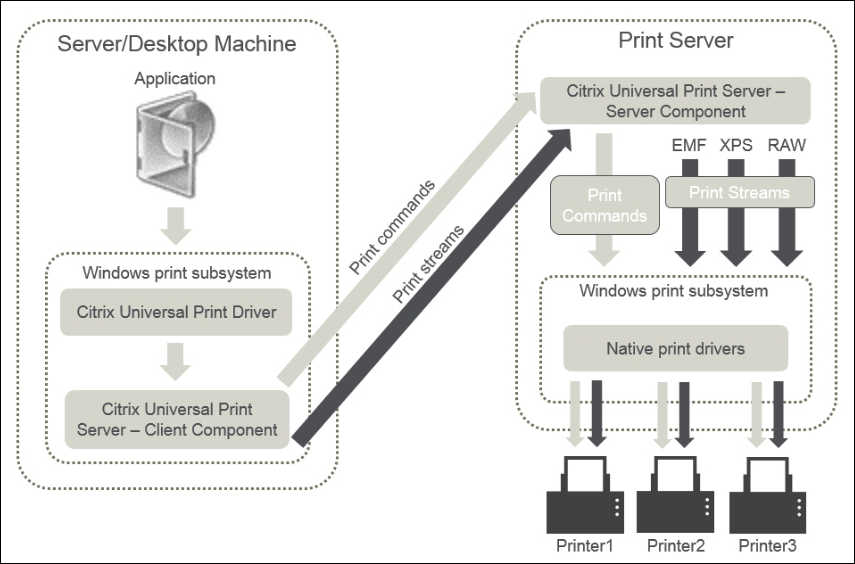
UPSは、特にWANリンクを介したネットワーク印刷や大規模環境において、いくつかの利点を提供します。
- ネットワーク最適化: VDAとUPServer間で送信される印刷データは最適化および圧縮され、帯域幅の消費を削減します。これはWAN接続で特に重要です
- 一元化されたドライバー管理: ネットワークプリンターにCitrix UPDを活用することで、VDAに多数のネイティブプリンタードライバーをインストールおよび管理する必要性を減らします
- 高可用性: 複数のUPServer間での負荷分散と、サーバーが利用できなくなった場合の自動フェイルオーバーをサポートします
要件
-  Microsoft Visual C++ 2015–2022 再頒布可能パッケージ
-  Microsoft .NET Framework 4.8 (最小)
-  UPServerのOS要件
-  Windows Server 2025
-  Windows Server 2022
-  Windows Server 2019
この機能はデフォルトで無効になっています。関連する設定と構成は、「Universal Print Server」テンプレートにあります。このテンプレートのポリシー設定を使用して、Universal Print Serverのエクスペリエンスをさらにカスタマイズおよび最適化できます。
-
有効化設定に加えて、いくつかのポリシー設定がUPSの動作を微調整します。
- 通信用のポート構成 (HTTP/SOAP、CGP、およびそれらのSSL/TLS同等物)
- 印刷ストリームの入力帯域幅制限
- 負荷分散用のUPServerのリスト
- フェイルオーバー検出のためのサービス停止しきい値
- Webサービス接続のタイムアウト
- セキュアな通信のためのSSL/TLS構成設定
詳細については、Citrix UPSポリシー設定を参照してください。
ベストプラクティス
- WANリンクを介したネットワーク印刷にUPSを使用してパフォーマンスを最適化します
- Citrix Universal Print Driver (UPD) を活用してVDAでのドライバー管理を削減します
- 高可用性のために複数のUPServer間で負荷分散を構成します
ユースケース
Citrixは、WANリンクを含むリモートプリントサーバーシナリオにUPSを明示的に推奨しています。また、VDAドライバーのフットプリントを最小限に抑え、ネットワーク印刷パフォーマンスを向上させ、ネットワーク印刷の高可用性を提供し、またはネットワークロケーションに基づいた近接印刷を実装しようとする環境にも最適です。ネットワークプリンターに直接接続できないシンクライアントは、VDAを介してUPSを活用できます。
共有
共有
この記事の概要
This Preview product documentation is Citrix Confidential.
You agree to hold this documentation confidential pursuant to the terms of your Citrix Beta/Tech Preview Agreement.
The development, release and timing of any features or functionality described in the Preview documentation remains at our sole discretion and are subject to change without notice or consultation.
The documentation is for informational purposes only and is not a commitment, promise or legal obligation to deliver any material, code or functionality and should not be relied upon in making Citrix product purchase decisions.
If you do not agree, select I DO NOT AGREE to exit.