Performing UEFI updates via notification
– from Scout 15 2107 and eLux® RP 6 2107 –
| Requires |
- The relevant devices have the UEFI BIOS update daemon installed (/en-us/unicon-elux-scout/short_guides/elux_bios_update/uefi_update_gui/uefi_epm.html).
|
- The UEFI firmware archives are available on the web server (/en-us/unicon-elux-scout/short_guides/elux_bios_update/uefi_update_gui/uefi_binaries.html).
|
- The*.udf file is located in the eLux container and is referenced in the device configuration (/en-us/unicon-elux-scout/short_guides/elux_bios_update/uefi_update_gui/uefi_update_configure.html).
|
By using UEFI update notifications, you send an explicit one-time update request to selected devices that are evaluated with the next connection.
- Select a device, an OU, a Dynamic Device Group or devices in the All devices window. .
- On the context menu, click Notifications > Initiate UEFI update.
-
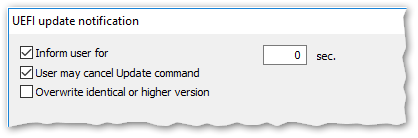
Edit the following options:
| |
 |
| 1 |
Users will be informed before a UEFI update is performed and are allowed to reschedule depending on the configuration. |
| 2 |
Users are additionally allowed to cancel the command. |
| 3 |
The UEFI system will be overwritten in any case. This option is mandatory for a downgrade. |
The options correspond to the dialog options for execution by command, see Performing UEFI updates via Scout command.
- Confirm the notification and confirmation.
The notifications for UEFI updates are activated for the relevant devices.
For each device, in the Properties window, the UEFI update notification field shows the status Activated.
Deleting a UEFI update notification for one or more devices
UEFI update notifications can be deleted before the firmware has been updated:
- On the context menu, click Notifications > Delete UEFI update notification.
Note:
Notifications are always set or deleted for all selected devices regardless of whether they are only available for individual devices.
The official version of this product documentation is in English. Any non-English version is solely provided for your convenience and may include machine-translated content. For more information, please refer to the Machine Translation Disclaimer on Cloud Software Group home.
DIESER DIENST KANN ÜBERSETZUNGEN ENTHALTEN, DIE VON GOOGLE BEREITGESTELLT WERDEN. GOOGLE LEHNT JEDE AUSDRÜCKLICHE ODER STILLSCHWEIGENDE GEWÄHRLEISTUNG IN BEZUG AUF DIE ÜBERSETZUNGEN AB, EINSCHLIESSLICH JEGLICHER GEWÄHRLEISTUNG DER GENAUIGKEIT, ZUVERLÄSSIGKEIT UND JEGLICHER STILLSCHWEIGENDEN GEWÄHRLEISTUNG DER MARKTGÄNGIGKEIT, DER EIGNUNG FÜR EINEN BESTIMMTEN ZWECK UND DER NICHTVERLETZUNG VON RECHTEN DRITTER.
CE SERVICE PEUT CONTENIR DES TRADUCTIONS FOURNIES PAR GOOGLE. GOOGLE EXCLUT TOUTE GARANTIE RELATIVE AUX TRADUCTIONS, EXPRESSE OU IMPLICITE, Y COMPRIS TOUTE GARANTIE D'EXACTITUDE, DE FIABILITÉ ET TOUTE GARANTIE IMPLICITE DE QUALITÉ MARCHANDE, D'ADÉQUATION À UN USAGE PARTICULIER ET D'ABSENCE DE CONTREFAÇON.
ESTE SERVICIO PUEDE CONTENER TRADUCCIONES CON TECNOLOGÍA DE GOOGLE. GOOGLE RENUNCIA A TODAS LAS GARANTÍAS RELACIONADAS CON LAS TRADUCCIONES, TANTO IMPLÍCITAS COMO EXPLÍCITAS, INCLUIDAS LAS GARANTÍAS DE EXACTITUD, FIABILIDAD Y OTRAS GARANTÍAS IMPLÍCITAS DE COMERCIABILIDAD, IDONEIDAD PARA UN FIN EN PARTICULAR Y AUSENCIA DE INFRACCIÓN DE DERECHOS.
本服务可能包含由 Google 提供技术支持的翻译。Google 对这些翻译内容不做任何明示或暗示的保证,包括对准确性、可靠性的任何保证以及对适销性、特定用途的适用性和非侵权性的任何暗示保证。
このサービスには、Google が提供する翻訳が含まれている可能性があります。Google は翻訳について、明示的か黙示的かを問わず、精度と信頼性に関するあらゆる保証、および商品性、特定目的への適合性、第三者の権利を侵害しないことに関するあらゆる黙示的保証を含め、一切保証しません。
ESTE SERVIÇO PODE CONTER TRADUÇÕES FORNECIDAS PELO GOOGLE. O GOOGLE SE EXIME DE TODAS AS GARANTIAS RELACIONADAS COM AS TRADUÇÕES, EXPRESSAS OU IMPLÍCITAS, INCLUINDO QUALQUER GARANTIA DE PRECISÃO, CONFIABILIDADE E QUALQUER GARANTIA IMPLÍCITA DE COMERCIALIZAÇÃO, ADEQUAÇÃO A UM PROPÓSITO ESPECÍFICO E NÃO INFRAÇÃO.