Windows Secure Boot certificate expiration and CA updates
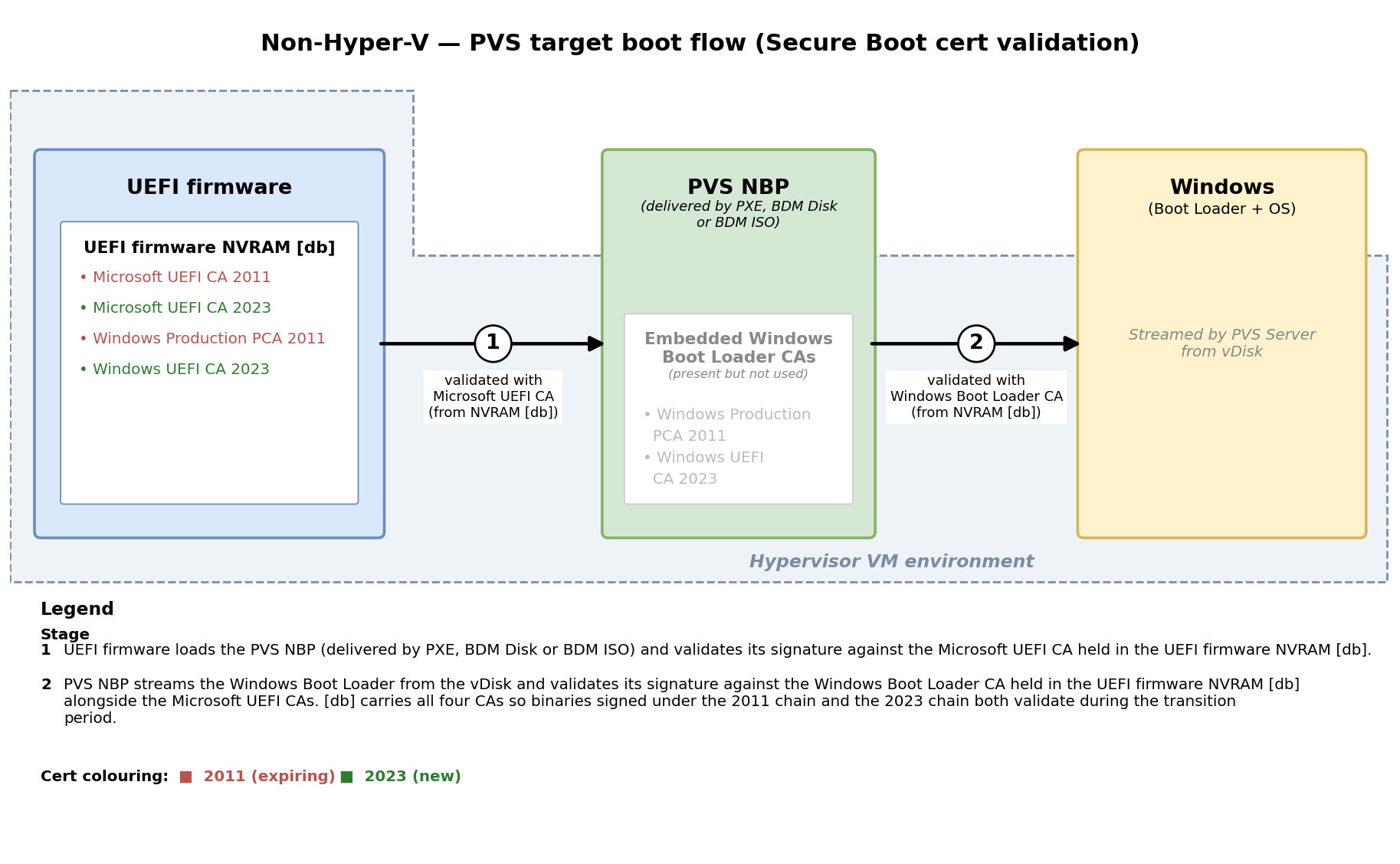
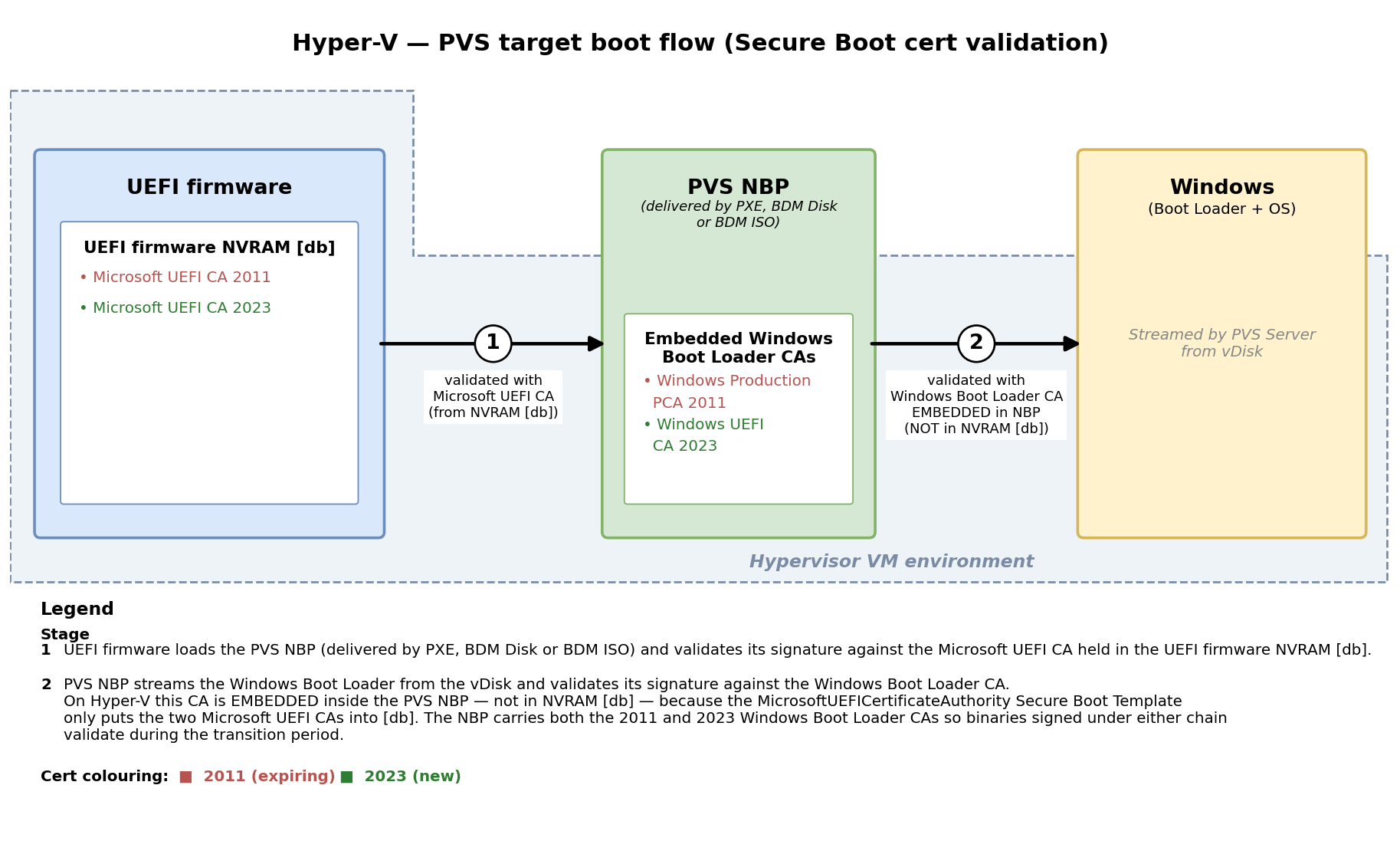
As documented by Microsoft, the CA certificates used to validate binaries under Secure Boot are expiring in 2026 and have been replaced by new CA certificates. When a Citrix Provisioning target VDA boots, two CA certificates are involved:
-
CA certificate that validates the Citrix Provisioning Network Boot Program (NBP) — present in the target VM’s UEFI firmware NVRAM
dbdatabase.- Existing (expiring): Microsoft UEFI CA 2011
- New: Microsoft UEFI CA 2023
-
CA certificate that validates the Windows Boot Loader — location depends on the hypervisor:
- On every hypervisor except Hyper-V: also present in the target VM’s UEFI firmware NVRAM
dbdatabase (alongside the NBP CA). - On Hyper-V: not in the UEFI firmware NVRAM
db. The Hyper-VMicrosoftUEFICertificateAuthoritySecure Boot Template only places the UEFI CA intodb; the Windows Boot Loader CA used to validate the Windows Boot Loader is the one embedded inside the PVS NBP itself. - Existing (expiring): Microsoft Windows Production PCA 2011
- New: Windows UEFI CA 2023
- On every hypervisor except Hyper-V: also present in the target VM’s UEFI firmware NVRAM
Citrix Provisioning ships the NBP in two flavours; both are signed with the same certificate chain and (on Hyper-V) embed the same Windows Boot Loader CA — the difference is delivery and refresh cadence:
- PXE-delivered NBP — served by the PVS TFTP service to targets booting over PXE. Refreshes automatically on the next target boot after the PVS farm is upgraded to a version that ships the new certificate chain.
- BDM / ISO-embedded NBP — baked into each BDM boot disk or bootable ISO at creation time. Refreshes only when the BDM disk or ISO is regenerated after upgrading PVS.
Important:
Even after your hypervisor is upgraded, existing VMs are not automatically updated — the certificate information is stored in the UEFI firmware NVRAM
dbdatabase, which is part of the VM.
Boot flow: which certificate validates each stage
The validation chain differs slightly on Hyper-V because its Secure Boot Template design puts only the Microsoft UEFI CA into the UEFI firmware NVRAM db — the Windows Boot Loader CA is instead embedded inside the PVS NBP.
Non-Hyper-V hypervisors (VMware, XenServer, Nutanix, Azure, GCP, OpenShift)
Hyper-V
Upgrading your environment
Three steps (depending on boot method):
- Upgrade the hypervisor to a version that includes the new certificates.
- Update existing VMs so the new certificates are in their UEFI firmware NVRAM
db. - If using BDM or ISO boot, regenerate every BDM disk and ISO image so the NBP embedded in them is signed with the new certificate chain (and, on Hyper-V, so the Windows Boot Loader CA embedded inside the NBP is refreshed).
Important:
Do steps 1 and 2 now. Do not revoke the old Secure Boot certificates (per CVE-2023-24932 mitigation) until step 3 is complete — until every BDM disk and ISO in your environment carries a PVS NBP signed with the new certificate chain, revoking the old certificates would prevent those images from booting. The NBP in this release is still signed with the old 2011 certificate — release notes for PVS will include a notification when it starts shipping with NBP signed by the 2023 certificate.
Upgrading the hypervisor
Minimum hypervisor versions:
| Hypervisor | Minimum version |
|---|---|
| VMware/ESXi | vSphere 8.0 Update 3j (ESXi 8.0 P09, build 24000000+), vSphere 7.0 Update 3p, or vSphere 9. Ships the 2023 certificates for new target VMs and provides the resetOnce mechanism used to inject them into existing VMs. Virtual Hardware Version 14 or higher. Earlier 8.0 U3h ships the certificates for new VMs only. See Appendix 2 → VMware vSphere. |
| XenServer | 8.4 or 9 with the July 16, 2026 update. Earlier updates (e.g. 8.4 November 2025) ship the 2023 certificates for new target VMs only; the July 16 2026 update adds the xe toolstack support needed to inject them into existing VMs — see Appendix 2 → XenServer. |
| Hyper-V | Server 2019+ with latest updates (Server 2019 requires manual steps; 2022/2025 automatic) |
| Azure | New certificates available since late 2024; older VMs must be reprovisioned |
| Nutanix | AVH 20230302.101026 (AOS 6.5.1) |
| OpenShift | 4.17 or later |
| GCP | Check existing VMs with the script provided |
Upgrading existing VMs
Note:
If a VM has a virtual TPM enabled, on hypervisors without a UEFI firmware NVRAM remediation mechanism it cannot be updated in place and must be reprovisioned. On the hypervisors listed below the update can be applied to vTPM-enabled VMs — VMware vSphere 8.0 U3j / 7.0 U3p / vSphere 9, and XenServer 8.4 / 9 with the July 16 2026 update — but injecting the 2023 certificates into the UEFI firmware NVRAM
dbchanges the VM’s PCR7 measurement (PCR7 measures the Secure Boot policy and the contents of the KEK / db / dbx databases). Any Windows feature or guest-side artefact that has sealed data to the current PCR7 value stops working after the update until it is re-sealed or reconfigured, including BitLocker (TPM-sealed volume keys), Windows Hello for Business, Credential Guard and Device Guard measurements, Device Health Attestation, and any third-party disk / key protection bound to PCR7. Review affected targets and plan to re-provision or re-seal the dependent state.
| Hypervisor | Procedure |
|---|---|
| VMware vSphere 8 / 7 (ESXi 8.0 U3j / 7.0 U3p or later) | Set the uefi.secureBoot.db.resetOnce and uefi.secureBoot.KEK.resetOnce VMX flags to TRUE while the VM is powered off — see Appendix 2 → VMware vSphere. |
| VMware vSphere 8 / 7 (pre-July 2026 ESXi update) | Not possible without the resetOnce mechanism. Upgrade to ESXi 8.0 U3j (P09) or ESXi 7.0 U3p and follow Appendix 2 → VMware vSphere, or reprovision. |
| VMware vSphere 9 | Set the same resetOnce VMX flags as above, or reset Secure Boot keys to factory defaults via the vSphere Client UI or vicfg-uefi CLI — see Appendix 2 → VMware vSphere. |
| XenServer 8.4 / 9 (July 16 2026 update) | Mark each VM with xe vm-update-secureboot-certificates-on-boot uuid=<UUID> mark=true, or enable pool-wide auto-remediation — see Appendix 2 → XenServer. |
| XenServer 8.4 / 9 (pre-July 16 2026 update) | Not possible without the toolstack change. Apply the July 16 2026 update to the pool and follow Appendix 2 → XenServer, or reprovision. |
| Hyper-V | Toggle Secure Boot Template to another value and back to MicrosoftUEFI |
| Other | Reprovision |
Determine if a VM uses Secure Boot and has the new certificates
You can run msinfo32 inside a Windows VM to determine if secure boot is enabled, but that won’t show whether the new certificates are present in the UEFI firmware NVRAM db. Use the script in Appendix 1. In addition, if you want to find all the VMs using secure boot it is better to use the hypervisor commands.
Upgrade the Citrix Provisioning target boot process
- Network/PXE Boot: Targets automatically get the updated PVS NBP on next boot after the farm is upgraded (the PXE-delivered NBP variant refreshes without any per-target action).
-
BDM Disk Boot: Update all BDM disks via the PVS console or PowerShell cmdlet
Start-PvsDeviceUpdateBdm— this refreshes the BDM/ISO-embedded NBP variant with the new certificate chain. -
BDM ISO Boot: Use
BDM.exeto create new ISO images, upload them to the hypervisor, and change VM definitions to boot from the new ISO.
Appendix 1
Extract-db.ps1
Downloadable PowerShell script that reads the target VM’s UEFI firmware NVRAM db database on a running Windows guest, extracts every X.509 certificate to a .cer file, and prints a Subject / Thumbprint / NotAfter summary. Use it to determine whether the Microsoft 2023 CAs have been injected alongside the 2011 CAs after applying the Appendix 2 procedure.
Download
Run inside the target Windows guest (Windows PowerShell 5.1 or PowerShell 7). No arguments — it writes the raw db to a temp directory, writes each extracted cert as a .cer, writes a CSV summary, and prints the summary table to the console.
Sample output — non-Hyper-V VM before remediation
Two entries expected in the db: Microsoft Windows Production PCA 2011 and Microsoft Corporation UEFI CA 2011.
PS C:\Users\Administrator\Downloads> .\Extract-db.ps1
SecureBoot enabled: False
Wrote raw UEFI db to: C:\Users\ADMINI~1\AppData\Local\Temp\2\uefi-db-certs-20260811-082351\db.bin
Parsing for X.509 certs...

Extracted 2 X.509 cert(s) from UEFI db.
Output directory: C:\Users\ADMINI~1\AppData\Local\Temp\2\uefi-db-certs-20260811-082351
CSV summary:      C:\Users\ADMINI~1\AppData\Local\Temp\2\uefi-db-certs-20260811-082351\db-certs.csv

Index Thumbprint                               NotAfter              Subject
----- ----------                               --------              -------
    1 46DEF63B5CE61CF8BA0DE2E6639C1019D0ED14F3 6/27/2026 5:32:45 PM  CN=Microsoft Corporation UEFI CA 2011, O=Micros...
    2 580A6F4CC4E4B669B9EBDC1B2B3E087B80D0678D 10/19/2026 2:51:42 PM CN=Microsoft Windows Production PCA 2011, O=Mic...
<!--NeedCopy-->
Sample output — non-Hyper-V VM after remediation
Four entries expected: the two 2011 CAs above still present (the reset repopulates from the host templates, which contain both the 2011 and 2023 CAs so binaries signed under either chain continue to validate during the transition), plus Microsoft UEFI CA 2023 and Windows UEFI CA 2023.
PS C:\Users\administrator\Desktop> .\Extract-db.ps1
SecureBoot enabled: True
Wrote raw UEFI db to: C:\Users\ADMINI~1\AppData\Local\Temp\uefi-db-certs-20260731-081914\db.bin
Parsing for records...
Extracted 4 item(s) from UEFI db.
Output directory: C:\Users\ADMINI~1\AppData\Local\Temp\uefi-db-certs-20260731-081914
CSV summary:      C:\Users\ADMINI~1\AppData\Local\Temp\uefi-db-certs-20260731-081914\db-records.csv
Index Type             NotAfter               Subject
----- ----             --------               -------
    1 X509 Certificate 12/31/2019 12:16:05 PM O="VMware, Inc.", L=Palo Alto, S=California, C=US
    2 X509 Certificate 10/19/2037 2:47:59 AM  CN=VMware Secure Boot Signing, O="VMware, Inc.", L=Palo Alto, S=Califo...
    3 X509 Certificate 6/27/2026 5:32:45 PM   CN=Microsoft Corporation UEFI CA 2011, O=Microsoft Corporation, L=Redm...
    4 X509 Certificate 10/19/2026 2:51:42 PM  CN=Microsoft Windows Production PCA 2011, O=Microsoft Corporation, L=R...
<!--NeedCopy-->
Sample output — Hyper-V VM before remediation
One entry expected: Microsoft Corporation UEFI CA 2011 only. The Windows Boot Loader CA is not in the Hyper-V db — it is embedded inside the PVS NBP itself, so Extract-db.ps1 will never show a Windows Boot Loader CA entry on a Hyper-V target regardless of remediation state.
PS C:\Users\administrator.MCU\Desktop> .\Extract-db.ps1
SecureBoot enabled: True
Wrote raw UEFI db to: C:\Users\ADMINI~1.MCU\AppData\Local\Temp\uefi-db-certs-20260731-075003\db.bin
Parsing for records...
Extracted 2 item(s) from UEFI db.
Output directory: C:\Users\ADMINI~1.MCU\AppData\Local\Temp\uefi-db-certs-20260731-075003
CSV summary:      C:\Users\ADMINI~1.MCU\AppData\Local\Temp\uefi-db-certs-20260731-075003\db-records.csv
Index Type             NotAfter              Subject
----- ----             --------              -------
    1 X509 Certificate 10/19/2026 2:51:42 PM CN=Microsoft Windows Production PCA 2011, O=Microsoft Corporation, L=Re...
<!--NeedCopy-->
Sample output — Hyper-V VM after remediation
Two entries expected: Microsoft Corporation UEFI CA 2011 and Microsoft UEFI CA 2023 after the Secure Boot Template toggle has refreshed the db from the updated Hyper-V template.
PS C:\Users\administrator.MCU\Desktop> .\Extract-db.ps1
SecureBoot enabled: True
Wrote raw UEFI db to: C:\Users\ADMINI~1.MCU\AppData\Local\Temp\uefi-db-certs-20260731-075003\db.bin
Parsing for records...
Extracted 2 item(s) from UEFI db.
Output directory: C:\Users\ADMINI~1.MCU\AppData\Local\Temp\uefi-db-certs-20260731-075003
CSV summary:      C:\Users\ADMINI~1.MCU\AppData\Local\Temp\uefi-db-certs-20260731-075003\db-records.csv
Index Type             NotAfter              Subject
----- ----             --------              -------
    1 X509 Certificate 10/19/2026 2:51:42 PM CN=Microsoft Windows Production PCA 2011, O=Microsoft Corporation, L=Re...
    2 X509 Certificate 6/13/2035 3:08:29 PM  CN=Windows UEFI CA 2023, O=Microsoft Corporation, C=US
<!--NeedCopy-->
VMware
Prerequisites for VMware PowerCLI on the workstation you’ll run these commands from:
- PowerShell version: Windows PowerShell 5.1 or PowerShell 7.x. PowerCLI 13.x and later require PowerShell 7.x.
- Execution policy must permit script execution:
Set-ExecutionPolicy -ExecutionPolicy RemoteSigned -Scope CurrentUser
<!--NeedCopy-->
-
PSGallery must be a trusted PowerShell repository (avoids the “Untrusted repository” prompt during
Install-Module):
Set-PSRepository -Name PSGallery -InstallationPolicy Trusted
<!--NeedCopy-->
Install and import PowerCLI:
Install-Module -Name VMware.PowerCLI -Scope CurrentUser
Import-Module VMware.PowerCLI
<!--NeedCopy-->
Configure PowerCLI to accept self-signed vCenter certificates (typical in lab / on-prem deployments) and to skip the CEIP prompt so it does not interrupt scripting:
Set-PowerCLIConfiguration -InvalidCertificateAction Ignore -ParticipateInCEIP $false -Confirm:$false -Scope User
<!--NeedCopy-->
Connect to vCenter or an ESXi host:
Connect-VIServer -Server <your-vcenter-or-esxi-host>
<!--NeedCopy-->
Check every VM’s Secure Boot state:
Get-VM | Select Name, @{N='SecureBoot';E={ ($_ | Get-VMFirmware).EnableSecureBoot }}
<!--NeedCopy-->
Specific VM:
$vm = Get-VM -Name 'YourVMName'
$firmware = $vm | Get-VMFirmware
$firmware.EnableSecureBoot
<!--NeedCopy-->
pyVmomi
Prerequisites:
- Python 3.9 or later.
- Install pyVmomi from PyPI (pulls
requestsas a transitive dependency, so the workstation must be able to reach PyPI or your internal mirror):
pip install pyvmomi
<!--NeedCopy-->
Full working example — connects to vCenter, enumerates every VM, and reports each VM’s Secure Boot state:
import ssl
from pyVim.connect import SmartConnect, Disconnect
from pyVmomi import vim

# For a self-signed vCenter cert (typical in labs / on-prem PoC): disable verification.
# For production, replace with:
#     context = ssl.create_default_context(cafile="<path-to-CA-bundle>")
context = ssl._create_unverified_context()

si = SmartConnect(host="<your-vcenter-or-esxi-host>",
                  user="<username>",
                  pwd="<password>",
                  sslContext=context)

try:
    content = si.RetrieveContent()
    view = content.viewManager.CreateContainerView(
        content.rootFolder, [vim.VirtualMachine], True)
    for vm in view.view:
        if vm.config.firmware == "efi":
            print(f"{vm.name}: Secure Boot enabled = "
                  f"{vm.config.bootOptions.efiSecureBootEnabled}")
        else:
            print(f"{vm.name}: not EFI firmware")
    view.Destroy()
finally:
    Disconnect(si)
<!--NeedCopy-->
XenServer
Note:
The
xecommands below run from a host login session on the pool master. Reach it via XenCenter → select the host → Console tab or via an SSH session to the host (default userroot).
xe vm-list is-control-domain=false
xe vm-param-get uuid=<VM-UUID> param-name=platform
<!--NeedCopy-->
Look for secureboot: true.
Script to check every VM’s Secure Boot state:
for UUID in $(xe vm-list is-control-domain=false --minimal | tr ',' '
'); do
    NAME=$(xe vm-param-get uuid=$UUID param-name=name-label)
    PLATFORM=$(xe vm-param-get uuid=$UUID param-name=platform)
    SECURE_BOOT=$(echo "$PLATFORM" | grep -oE 'secureboot: [^;]+' | awk '{print $2}')
    echo "$NAME: Secure Boot = ${SECURE_BOOT:-not set}"
done
<!--NeedCopy-->
List all Secure Boot VMs:
xe vm-list platform:secureboot=true params=name-label --minimal | tr ',' '
'
<!--NeedCopy-->
Checking templates
xe template-list params=name-label,is-default-template
<!--NeedCopy-->
Hyper-V
Note:
Run on the Hyper-V host, not the SCVMM machine.
Get-VM | Get-VMFirmware -ErrorAction SilentlyContinue | Select-Object VMName, SecureBoot
Get-VM -Name "YourVMName" | Get-VMFirmware | Select-Object SecureBoot
<!--NeedCopy-->
Important:
Only Generation 2 VMs support Secure Boot.
Appendix 2
VMware vSphere
Applies to VMware vSphere 8.0 Update 3j (ESXi 8.0 P09, build 24000000+), vSphere 7.0 Update 3p, and vSphere 9 or later. The uefi.secureBoot.*.resetOnce VMX mechanism was introduced on vSphere 9 and back-ported to 8.0 / 7.0 in the July 2026 ESXi updates, so the same procedure now covers all three releases.
Prerequisites
- Host at the minimum version above. On vSphere 8.0 U3h and earlier, the
resetOnceparameters have no effect because the host UEFI templates do not yet carry the 2023 certificates. - Target VM is Virtual Hardware Version 14 or higher.
- VM must be Powered Off to write the VMX advanced settings; the UEFI firmware NVRAM
dbreset happens during the subsequent cold boot. ESXi automatically clears theresetOnceflags from the.vmxafter they fire. - Templates can also be updated (see the sweep script below). Applying the flags to a template causes the first boot of any clone derived from the template to pick up the 2023 certs, then the flag self-clears on that clone.
- If a target VM or template has a vTPM attached, see the PCR7 warning in Upgrading existing VMs above. The sweep script skips vTPM-enabled entities by default and lists them for the operator to review; re-run with
-IncludeVTpmto include them.
Apply the reset flags
Set the following two one-time VMX advanced parameters on each target VM (via the vSphere Client → VM → Edit Settings → VM Options → Advanced → Edit Configuration, or via PowerCLI). Both must be TRUE:
| Parameter | Purpose |
|---|---|
uefi.secureBoot.db.resetOnce |
Clears and repopulates the active Signature Database (db) with the Microsoft UEFI CA 2023 certificate required by 2023-signed PVS NBPs and Windows bootloaders. |
uefi.secureBoot.KEK.resetOnce |
Clears and repopulates the Key Exchange Key (KEK) database so the certificate store stays consistent with the refreshed db. |
Power the VM back on — the UEFI firmware NVRAM db update is injected during domain initialization, then ESXi removes both flags from the .vmx. PK and dbx are deliberately left alone because they do not need to change for the 2023 CA migration and resetting them can undo unrelated site configuration.
On vSphere 9 an equivalent full-key reset is also available from the vSphere Client UI (VM → Configure → Security → Reset Secure Boot keys to factory defaults) and via the vicfg-uefi CLI; both reset all four keys (PK, KEK, db, dbx) rather than just db + KEK. Use these only if you specifically need a full reset — the VMX parameter approach above is narrower and applies uniformly to vSphere 8, 7, and 9.
Sweep every eligible target VM and template (PowerCLI)
Sample script — enumerates Powered-Off UEFI Secure Boot VMs and all templates in a target cluster or folder, skips any with a vTPM (unless overridden), sets the two resetOnce flags on the remainder, and optionally powers the VMs back on to apply the reset.
param (
    [Parameter(Mandatory=$true)][string]$vCenterServer,
    [Parameter(Mandatory=$true)][string]$TargetClusterOrFolder,
    [switch]$IncludeVTpm,
    [switch]$AutoPowerOn
)

Connect-VIServer -Server $vCenterServer

# Resolve target scope (accepts either a cluster or a VM folder).
$scope = Get-Cluster -Name $TargetClusterOrFolder -ErrorAction SilentlyContinue
if (-not $scope) { $scope = Get-Folder -Name $TargetClusterOrFolder -ErrorAction SilentlyContinue }
if (-not $scope) { throw "Could not resolve '$TargetClusterOrFolder' as a cluster or folder." }

Write-Host "Querying VMs..." -ForegroundColor Cyan
$vms = @($scope | Get-VM | Where-Object {
    $_.PowerState -eq "PoweredOff" -and
    $_.ExtensionData.Config.BootOptions.EfiSecureBootEnabled -eq $true
})

Write-Host "Querying templates..." -ForegroundColor Cyan
$dc = $scope | Get-Datacenter
$templates = @(Get-Template -Location $dc | Where-Object {
    $_.ExtensionData.Config.BootOptions.EfiSecureBootEnabled -eq $true
})

$targets = $vms + $templates
if ($targets.Count -eq 0) {
    Write-Host "No eligible Secure Boot VMs or templates found in target scope." -ForegroundColor Yellow
    Disconnect-VIServer -Confirm:$false
    exit
}

# Identify vTPM-enabled entities. Injecting the 2023 certs changes PCR7 and
# can break TPM-sealed guest state (BitLocker, Hello for Business, Credential
# Guard, Device Health Attestation, third-party TPM-based encryption).
$hasVTpm = { param($e) $e.ExtensionData.Config.Hardware.Device |
             Where-Object { $_ -is [VMware.Vim.VirtualTPM] } }
$vtpmTargets  = @($targets | Where-Object { & $hasVTpm $_ })
$plainTargets = @($targets | Where-Object { -not (& $hasVTpm $_) })

if ($vtpmTargets.Count -gt 0) {
    Write-Warning "$($vtpmTargets.Count) target(s) have a vTPM. Injecting 2023 certs will change PCR7 and may invalidate TPM-sealed guest state (BitLocker, Hello for Business, Credential Guard, Device Health Attestation, third-party TPM-based encryption)."
    $vtpmTargets | ForEach-Object { Write-Warning "  vTPM: $($_.Name)" }
}

$apply = if ($IncludeVTpm) { $targets } else {
    if ($vtpmTargets.Count -gt 0) {
        Write-Host "Skipping vTPM targets. Re-run with -IncludeVTpm to include them." -ForegroundColor Yellow
    }
    $plainTargets
}

Write-Host "Applying resetOnce flags to $($apply.Count) target(s)..." -ForegroundColor Green
foreach ($t in $apply) {
    try {
        New-AdvancedSetting -Entity $t -Name "uefi.secureBoot.db.resetOnce"  -Value "TRUE" -Confirm:$false -Force | Out-Null
        New-AdvancedSetting -Entity $t -Name "uefi.secureBoot.KEK.resetOnce" -Value "TRUE" -Confirm:$false -Force | Out-Null
        Write-Host "  [OK] $($t.Name)" -ForegroundColor Green
    }
    catch {
        Write-Host "  [ERROR] $($t.Name): $_" -ForegroundColor Red
    }
}

if ($AutoPowerOn) {
    Write-Host "Powering on VMs..." -ForegroundColor Cyan
    $apply | Where-Object { $_ -is [VMware.VimAutomation.ViCore.Types.V1.Inventory.VirtualMachine] } |
             ForEach-Object {
        Start-VM -VM $_ -Confirm:$false | Out-Null
        Write-Host "  Powered on $($_.Name)" -ForegroundColor Green
    }
}

Disconnect-VIServer -Confirm:$false
Write-Host "Remediation complete." -ForegroundColor Cyan
<!--NeedCopy-->
Templates are updated in-place; their next-cloned VMs pick up the 2023 certs on first boot. VMs need a power cycle for the flags to fire — pass -AutoPowerOn to have the script boot them at the end, or schedule a normal restart of the delivery group.
Verify after reboot
In the Windows guest:
[System.Text.Encoding]::ASCII.GetString((Get-SecureBootUEFI db).bytes) -match 'Microsoft UEFI CA 2023'
<!--NeedCopy-->
Expected result: True.
The Appendix 1 Extract-db.ps1 script also works and gives a full subject / thumbprint / expiry breakdown of every certificate now in the UEFI firmware NVRAM db.
XenServer
Applies to XenServer 8.4 or XenServer 9 with the July 16 2026 update. Earlier updates ship the 2023 certificates for new target VMs only and do not expose the toolstack commands used below.
Note:
The
xecommands below run from a host login session on the pool master. Reach it via XenCenter → select the host → Console tab or via an SSH session to the host (default userroot).
Prerequisites
- Pool is on XenServer 8.4 or XenServer 9 with the July 16 2026 update. You can confirm the toolstack is on the right version by running
xe help vm-update-secureboot-certificates-on-booton the pool master — if the command is not recognised, the update has not been applied. - Certificate state lives in each VM’s private UEFI firmware NVRAM, so the host update on its own does not remediate existing target VMs.
- If any target VM has a vTPM attached, see the PCR7 warning in Upgrading existing VMs above. The sweep script below skips vTPM-enabled VMs by default and lists them for the operator to review; set
INCLUDE_VTPM=trueto include them. - The VM may be Running, Halted, or Suspended when you mark it. The actual UEFI firmware NVRAM
dbupdate is injected during domain init on the next cold start or standard reboot. State lifecycle:update_available→update_on_boot(marked) →ok(post-reboot).
Inspect certificate state
List every VM, template, and snapshot with its certificate state:
xe vm-list params=name-label,uuid,is-a-template,is-snapshot,secureboot-certificates-state
<!--NeedCopy-->
State values:
-
ok— UEFI firmware NVRAMdbalready has the 2023 certificates, or the VM is Legacy BIOS. -
update_available— VM is eligible for 2023 certificate injection. -
update_on_boot— VM is marked; injection will happen at next boot.
Mark a single VM
xe vm-update-secureboot-certificates-on-boot uuid=<VM_UUID> mark=true
<!--NeedCopy-->
Clear the mark before the VM reboots:
xe vm-update-secureboot-certificates-on-boot uuid=<VM_UUID> mark=false
<!--NeedCopy-->
Mark every eligible target VM and template in a pool
This includes templates (so new VMs cloned from them start on the 2023 certs) but skips snapshots and skips vTPM-enabled VMs unless you opt in:
# Set INCLUDE_VTPM=true to also mark VMs with a vTPM (see PCR7 warning above).
INCLUDE_VTPM=false

for uuid in $(xe vm-list secureboot-certificates-state=update_available \
                       is-a-snapshot=false --minimal | tr ',' '
'); do
    name=$(xe vm-param-get uuid=$uuid param-name=name-label 2>/dev/null)
    vtpms=$(xe vtpm-list vm-uuid=$uuid --minimal 2>/dev/null)
    if [ -n "$vtpms" ]; then
        if [ "$INCLUDE_VTPM" = "true" ]; then
            echo "INCLUDE (vTPM): $name"
        else
            echo "SKIP    (vTPM): $name  — set INCLUDE_VTPM=true to include"
            continue
        fi
    fi
    xe vm-update-secureboot-certificates-on-boot uuid=$uuid mark=true
    echo "MARK           : $name"
done
<!--NeedCopy-->
Each marked VM picks up the update at its next reboot. For PVS target VMs, schedule this alongside a normal restart of the delivery group. Marked templates apply the reset on the first boot of any clone derived from them; the flag then clears itself.
Pool-wide auto-remediation (optional)
Instead of marking VMs individually, enable pool-wide auto-update so every eligible VM is remediated at its next reboot / maintenance cycle:
xe pool-param-set uuid=<POOL_UUID> auto-update-vm-secureboot-certificates=true
<!--NeedCopy-->
Disable:
xe pool-param-set uuid=<POOL_UUID> auto-update-vm-secureboot-certificates=false
<!--NeedCopy-->
Do not enable pool-wide auto-remediation in a pool that contains vTPM-enabled targets whose TPM-sealed state has not been reviewed — the auto path does not distinguish vTPM VMs. Prefer the targeted script above in that case.
Verify after reboot
Host toolstack:
xe vm-param-get uuid=<VM_UUID> param-name=secureboot-certificates-state
<!--NeedCopy-->
Should return ok.
Windows guest:
Get-ItemProperty "HKLM:\SYSTEM\CurrentControlSet\Control\SecureBoot\Servicing" |
    Select-Object UEFICA2023Status
<!--NeedCopy-->
The Appendix 1 Extract-db.ps1 script also works on XenServer Windows guests and will show Microsoft Corporation UEFI CA 2023 in the extracted certificate set once remediation has completed.
Hyper-V
Two built-in templates:
-
MicrosoftWindows: trusts Windows Production CA only -
MicrosoftUEFICertificateAuthority: trusts Microsoft UEFI CA (required for Citrix Provisioning streamed VMs)
Note:
Cannot be done if the VM has a vTPM.
List templates:
(Get-VMHost).SecureBootTemplates
<!--NeedCopy-->
Find VMs using the UEFI template:
Get-VM | Where-Object Generation -eq 2 | ForEach-Object {
$firmware = Get-VMFirmware -VM $_
    if ($firmware.SecureBootTemplate -eq "MicrosoftUEFICertificateAuthority") {
        [PSCustomObject]@{
            VMName     = $_.Name
            TPMEnabled = (Get-VMSecurity -VM $_).TPMEnabled
        }
    }
} | Format-Table -AutoSize
<!--NeedCopy-->
Toggle template to reset certificates:
Set-VMFirmware -VMName "YourVMName" -SecureBootTemplate MicrosoftWindows
Set-VMFirmware -VMName "YourVMName" -SecureBootTemplate MicrosoftUEFICertificateAuthority
<!--NeedCopy-->
Bulk script Update-PVS-VMs.ps1:
$vms = Get-VM | Get-VMFirmware -ErrorAction SilentlyContinue| Where-Object { $_.SecureBootTemplate -eq "MicrosoftUEFICertificateAuthority" }

foreach ($vmFirmware in $vms) {
    $vmName = $vmFirmware.VMName
    $vm = Get-VM -Name $vmName
    $tpmStatus = (Get-VMSecurity -VMName $vmName).TpmEnabled

    if ($tpmStatus -eq $true) {
        Write-Host "Ignoring VM: $vmName which has TPM enabled." -ForegroundColor Red
        continue
    }

    if ($vm.State -ne 'Off') {
        Write-Host "Ignoring VM: $vmName which is on." -ForegroundColor Red
        continue
    }

    Set-VMFirmware -VMName $vmName -SecureBootTemplate "MicrosoftWindows"
    Set-VMFirmware -VMName $vmName -SecureBootTemplate "MicrosoftUEFICertificateAuthority"
    Write-Host "Processed VM: $vmName." -ForegroundColor Green
}
<!--NeedCopy-->
Updating Server 2019 to enable the new CA certificates
Certificates are included in Cumulative Updates from May 2024 onwards but not automatically applied. Manual trigger steps:
- Set the registry trigger key:
reg add HKEY_LOCAL_MACHINE\SYSTEM\CurrentControlSet\Control\Secureboot /v AvailableUpdates /t REG_DWORD /d 0x5944 /f
<!--NeedCopy-->
- Run the scheduled task:
Start-ScheduledTask -TaskName "\Microsoft\Windows\PI\Secure-Boot-Update"
<!--NeedCopy-->
- Reboot.
- Verify:
[System.Text.Encoding]::ASCII.GetString((Get-SecureBootUEFI db).bytes) -match 'Windows UEFI CA 2023'
<!--NeedCopy-->
- Returns
True: protected and ready. - Returns
False: update failed (common in Hyper-V with incorrect Secure Boot Template).