This content has been machine translated dynamically.
Dieser Inhalt ist eine maschinelle Übersetzung, die dynamisch erstellt wurde. (Haftungsausschluss)
Cet article a été traduit automatiquement de manière dynamique. (Clause de non responsabilité)
Este artículo lo ha traducido una máquina de forma dinámica. (Aviso legal)
此内容已经过机器动态翻译。 放弃
このコンテンツは動的に機械翻訳されています。免責事項
이 콘텐츠는 동적으로 기계 번역되었습니다. 책임 부인
Este texto foi traduzido automaticamente. (Aviso legal)
Questo contenuto è stato tradotto dinamicamente con traduzione automatica.(Esclusione di responsabilità))
This article has been machine translated.
Dieser Artikel wurde maschinell übersetzt. (Haftungsausschluss)
Ce article a été traduit automatiquement. (Clause de non responsabilité)
Este artículo ha sido traducido automáticamente. (Aviso legal)
この記事は機械翻訳されています.免責事項
이 기사는 기계 번역되었습니다.책임 부인
Este artigo foi traduzido automaticamente.(Aviso legal)
这篇文章已经过机器翻译.放弃
Questo articolo è stato tradotto automaticamente.(Esclusione di responsabilità))
Translation failed!
ユーザー ストアへのパスを指定する
ユーザー ストアへのパスを指定する前に、 Profile Management architecture を参照し、展開に関連する場合は、次の影響を理解してください。
- 多言語プロファイルの保存
- インクルージョンとエクスクルージョンの組み合わせ
- Profile Management で、[Path to user store] ポリシーをダブルクリックします。
- [有効] を選択し、ユーザー設定(レジストリの変更と同期されたファイル)が保存されるディレクトリ(ユーザー ストア)へのパスを入力します。
パスは次のいずれかです。
-
相対パス。このパスは、ホームディレクトリに対する相対パスである必要があります。ホームディレクトリは通常、Active Directory (AD) のユーザーの #homeDirectory# 属性として構成されます。
-
UNC パス。このパスは通常、サーバー共有または DFS 名前空間を指定します。
-
無効または未構成。この場合、#homeDirectory#\Windows の値が想定されます。
この設定には、次の種類の変数を使用できます。
- パーセント記号で囲まれたシステム環境変数(例: %ProfVer%)。システム環境変数は通常、追加の設定が必要です。詳細については、「Administer profiles within and across OUs」を参照してください。
- ハッシュで囲まれた AD ユーザー オブジェクトの属性(例: #sAMAccountName#)。
- Profile Management 変数。詳細については、「Profile Management policies」を参照してください。
ユーザー環境変数は、%username% および %userdomain% を除いて使用できません。場所やユーザーなどの組織変数を定義するために、カスタム AD 属性を作成することもできます。属性は大文字と小文字を区別します。
例:
- \\server\share\#sAMAccountName# は、ユーザー設定をUNCパス \\server\share\JohnSmith に保存します(現在のユーザーに対して #sAMAccountName# が JohnSmith に解決される場合)
- \\server\profiles$\%USERNAME%.%USERDOMAIN%\!CTX_OSNAME!!CTX_OSBITNESS!は、\\server\profiles$\JohnSmith.Finance\Win8x64に展開される可能性があります
重要: 使用する属性または変数にかかわらず、この設定がNTUSER.DATを含むフォルダーより1レベル上のフォルダーに展開されることを確認してください。たとえば、このファイルが\server\profiles$\JohnSmith.Finance\Win8x64\UPM_Profileに含まれている場合、ユーザー ストアへのパスは\server\profiles$\JohnSmith.Finance\Win8x64(\UPM_Profileサブフォルダーではない)として設定します。
この図は、AD属性、環境変数、およびProfile Management変数を組み込んだ、ユーザー ストアへの一般的なパスのコンポーネントを示しています。
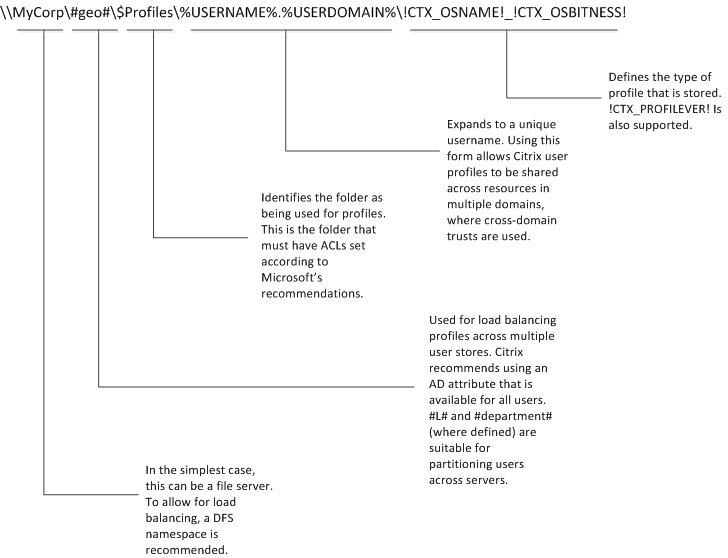
ユーザー ストアへのパスを指定する際の変数の使用に関する詳細については、以下のトピックを参照してください。
ユーザー ストアへのパスが無効になっている場合、ユーザー設定はホームディレクトリのWindowsサブディレクトリに保存されます。
ここでこの設定が構成されていない場合、.iniファイルの設定が使用されます。ここで、または.iniファイルでこの設定が構成されていない場合、ホームドライブのWindowsディレクトリが使用されます。
変更を有効にするには、https://docs.microsoft.com/ja-jp/windows-server/administration/windows-commands/gpupdateに記載されているように、コマンドプロンプトからgpupdate /forceコマンドを実行します。
共有
共有
この記事の概要
This Preview product documentation is Citrix Confidential.
You agree to hold this documentation confidential pursuant to the terms of your Citrix Beta/Tech Preview Agreement.
The development, release and timing of any features or functionality described in the Preview documentation remains at our sole discretion and are subject to change without notice or consultation.
The documentation is for informational purposes only and is not a commitment, promise or legal obligation to deliver any material, code or functionality and should not be relied upon in making Citrix product purchase decisions.
If you do not agree, select I DO NOT AGREE to exit.