Monitoring
The health check service allows administrators to check and monitor the availability and performance of an SCG instance and its internal components (backend, controller, MongoDB controller, OpenVPN, …) A health check request provides the overall status and the status of individual services as a result.
By default, the service is not active, but must first be started under Monitoring > Health check.
The health check is initially secured via an automatically generated token.
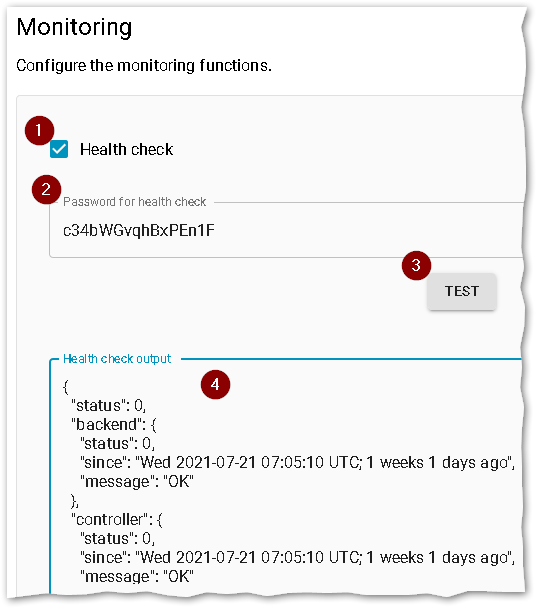 |
| Step | Operation |
|---|---|
| 1 | Activate health check |
| 2 | Optional: Define individual password |
| 3 | First save configuration, then click for a test request |
| 4 | Output: Overall status and status of each component |
Upon request, the system generates status information in [JSON] format on all relevant components.
-
Status
0means: No errors. -
If the overall status is
0, all components are running. -
The time stamp specifies from when a component is up / down.
Calling the health check service
For a call, an HTTP GET is executed on the health check URL with the configured token given with it.
Example with curl:
curl 'https://<SCG URL>/healthcheck' -H 'Connection: keep-alive' -H 'Authorization: Bearer <token>' -H 'Accept: application/json, text/plain' --insecure
<!--NeedCopy-->
The following parameters are used:
| Parameter | Description |
|---|---|
<SCG URL> |
URL of your Scout Cloud Gateway |
<token> |
Token or password as defined in the SCG WebAdmin Interface under Configuration > Monitoring |
--insecure |
Needs to be specified if you use a Self-Signed certificate |
For example, if Open VPN is not running, the result is as follows:
    {
      "status": 1,
      "backend": {
        "status": 0,
        "since": "Tue 2021-10-19 12:21:24 UTC; 1 weeks 2 days ago",
        "message": "OK"
      },
      "controller": {
        "status": 0,
        "since": "Tue 2021-10-19 13:30:21 UTC; 1 weeks 2 days ago",
        "message": "OK"
      },
      "mongod": {
        "status": 0,
        "since": "Tue 2021-10-19 12:20:58 UTC; 1 weeks 2 days ago",
        "message": "OK"
      },
      "nginx": {
        "status": 0,
        "since": "Tue 2021-10-19 12:20:56 UTC; 1 weeks 2 days ago",
        "message": "OK"
      },
      "openvpn": {
        "status": 3,
        "since": "Wed 2021-10-20 07:08:52 UTC; 1 weeks 1 days ago",
        "message": "ERROR"
      }
    }
<!--NeedCopy-->