Hochauflösende Displays
Bei Kunden, die hochauflösende Displays (6K, 8K und entsprechende Megapixelzahlen) mit Citrix Virtual Apps and Desktops™ einsetzen, können Leistungsprobleme oder Probleme wie Inkonsistenzen bei der Mausverfolgung sowie Probleme mit der Anzeigeskalierung und DPI auftreten.
Herkömmliche Auflösungen für typische Büromonitore sind 4K, 6K oder 8K, wobei die Bezeichnung “K” die horizontale Auflösung angibt.
Beispiele für 6K-Displays sind das Apple Pro Display XDR und das Dell UltraSharp U3224KB mit einer Auflösung von 6016 × 3384 und 6144 × 3456.
Derzeit sind nur eine Handvoll 8K-Monitore verfügbar, ein Beispiel dafür ist der Dell UltraSharp UP3218K mit einer Auflösung von 7680 x 4320.
Barco listet seine Monitore mit der MP- oder Megapixel-Anzahl anstelle ihrer Auflösung auf. Die neuesten Barco-Monitore sind 32-MP-Monitore mit einer angegebenen Auflösung von 6848 x 4560.
Citrix® unterstützt je nach Hardwareressourcen bis zu 8 Monitore. Je nach verwendeter GPU kann es andere Hardwarebeschränkungen für dieses Maximum geben.
Um die Leistung zu optimieren und potenzielle Probleme mit hochauflösenden Displays zu minimieren, empfiehlt Citrix die Verwendung von CVAD 2402.
VDA-Versionen ab 2402
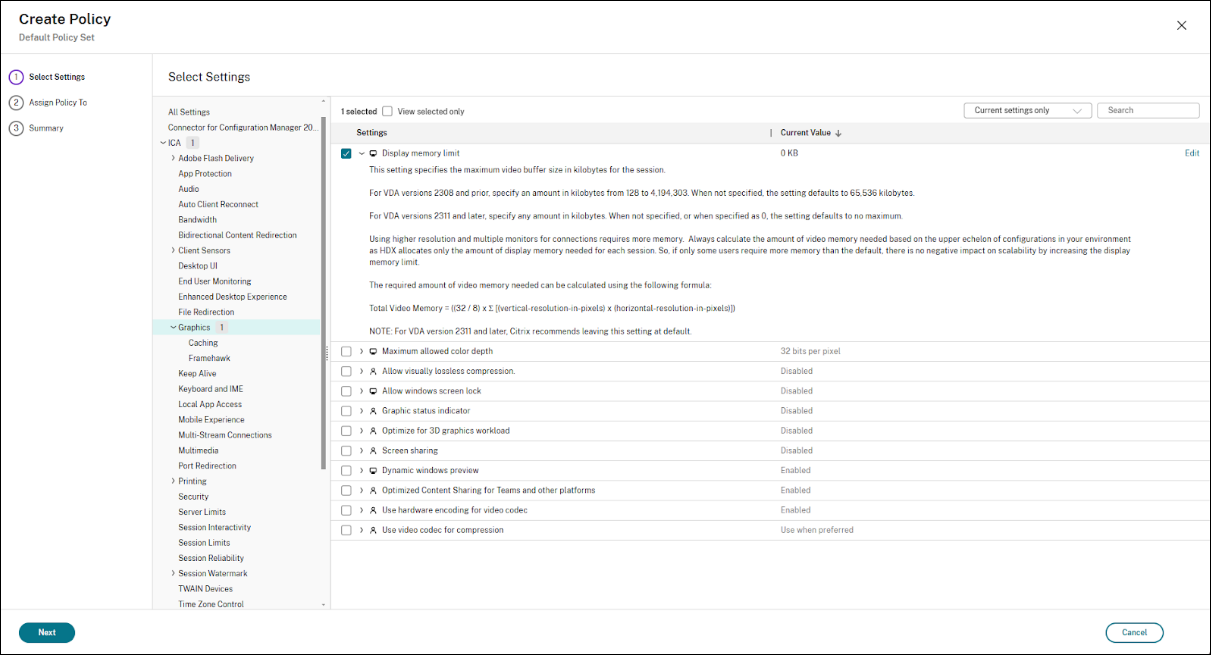
Belassen Sie für VDA 2402 und höher die Richtlinie “Speicherlimit anzeigen” auf dem Standardwert 0, d. h. es gibt kein Speicherlimit für die Anzeige. Dadurch kann der VDA den erforderlichen Anzeigespeicher dynamisch zuordnen.
Ältere VDA-Versionen (vor 2402)
Wenn ein Upgrade auf CVAD 2402 oder höher nicht möglich ist, konfigurieren Sie die Richtlinie “Speicherlimit anzeigen” auf den Maximalwert von 4.194.303 KB. Dadurch steht dem VDA der maximal verfügbare Anzeigespeicher zur Verfügung.
Die offizielle Version dieser Produktdokumentation ist in englischer Sprache verfasst. Nicht-englische Versionen wurden ausschließlich zu Ihrer Bequemlichkeit verfasst und können maschinell übersetzte Inhalte enthalten. Weitere Informationen finden Sie im Haftungsausschluss zur maschinellen Übersetzung (Machine Translation Disclaimer) auf Cloud Software Group home.
DIESER DIENST KANN ÜBERSETZUNGEN ENTHALTEN, DIE VON GOOGLE BEREITGESTELLT WERDEN. GOOGLE LEHNT JEDE AUSDRÜCKLICHE ODER STILLSCHWEIGENDE GEWÄHRLEISTUNG IN BEZUG AUF DIE ÜBERSETZUNGEN AB, EINSCHLIESSLICH JEGLICHER GEWÄHRLEISTUNG DER GENAUIGKEIT, ZUVERLÄSSIGKEIT UND JEGLICHER STILLSCHWEIGENDEN GEWÄHRLEISTUNG DER MARKTGÄNGIGKEIT, DER EIGNUNG FÜR EINEN BESTIMMTEN ZWECK UND DER NICHTVERLETZUNG VON RECHTEN DRITTER.
CE SERVICE PEUT CONTENIR DES TRADUCTIONS FOURNIES PAR GOOGLE. GOOGLE EXCLUT TOUTE GARANTIE RELATIVE AUX TRADUCTIONS, EXPRESSE OU IMPLICITE, Y COMPRIS TOUTE GARANTIE D'EXACTITUDE, DE FIABILITÉ ET TOUTE GARANTIE IMPLICITE DE QUALITÉ MARCHANDE, D'ADÉQUATION À UN USAGE PARTICULIER ET D'ABSENCE DE CONTREFAÇON.
ESTE SERVICIO PUEDE CONTENER TRADUCCIONES CON TECNOLOGÍA DE GOOGLE. GOOGLE RENUNCIA A TODAS LAS GARANTÍAS RELACIONADAS CON LAS TRADUCCIONES, TANTO IMPLÍCITAS COMO EXPLÍCITAS, INCLUIDAS LAS GARANTÍAS DE EXACTITUD, FIABILIDAD Y OTRAS GARANTÍAS IMPLÍCITAS DE COMERCIABILIDAD, IDONEIDAD PARA UN FIN EN PARTICULAR Y AUSENCIA DE INFRACCIÓN DE DERECHOS.
本服务可能包含由 Google 提供技术支持的翻译。Google 对这些翻译内容不做任何明示或暗示的保证,包括对准确性、可靠性的任何保证以及对适销性、特定用途的适用性和非侵权性的任何暗示保证。
このサービスには、Google が提供する翻訳が含まれている可能性があります。Google は翻訳について、明示的か黙示的かを問わず、精度と信頼性に関するあらゆる保証、および商品性、特定目的への適合性、第三者の権利を侵害しないことに関するあらゆる黙示的保証を含め、一切保証しません。
ESTE SERVIÇO PODE CONTER TRADUÇÕES FORNECIDAS PELO GOOGLE. O GOOGLE SE EXIME DE TODAS AS GARANTIAS RELACIONADAS COM AS TRADUÇÕES, EXPRESSAS OU IMPLÍCITAS, INCLUINDO QUALQUER GARANTIA DE PRECISÃO, CONFIABILIDADE E QUALQUER GARANTIA IMPLÍCITA DE COMERCIALIZAÇÃO, ADEQUAÇÃO A UM PROPÓSITO ESPECÍFICO E NÃO INFRAÇÃO.