-
-
サーバーグループの構成
This content has been machine translated dynamically.
Dieser Inhalt ist eine maschinelle Übersetzung, die dynamisch erstellt wurde. (Haftungsausschluss)
Cet article a été traduit automatiquement de manière dynamique. (Clause de non responsabilité)
Este artículo lo ha traducido una máquina de forma dinámica. (Aviso legal)
此内容已经过机器动态翻译。 放弃
このコンテンツは動的に機械翻訳されています。免責事項
이 콘텐츠는 동적으로 기계 번역되었습니다. 책임 부인
Este texto foi traduzido automaticamente. (Aviso legal)
Questo contenuto è stato tradotto dinamicamente con traduzione automatica.(Esclusione di responsabilità))
This article has been machine translated.
Dieser Artikel wurde maschinell übersetzt. (Haftungsausschluss)
Ce article a été traduit automatiquement. (Clause de non responsabilité)
Este artículo ha sido traducido automáticamente. (Aviso legal)
この記事は機械翻訳されています.免責事項
이 기사는 기계 번역되었습니다.책임 부인
Este artigo foi traduzido automaticamente.(Aviso legal)
这篇文章已经过机器翻译.放弃
Questo articolo è stato tradotto automaticamente.(Esclusione di responsabilità))
Translation failed!
サーバーグループの構成
冗長性と拡張性のために、ロードバランサーの背後にあるサーバーグループに2台以上の同一のStoreFrontサーバーを展開する必要があります。StoreFrontは、サーバー間でお気に入りデータを自動的に同期します。
複数サーバー展開を管理するには、一度に1台のサーバーのみを使用してサーバーグループの構成に変更を加えます。展開内の他のサーバーでCitrix StoreFront管理コンソールが実行されていないことを確認してください。変更が完了したら、展開全体で一貫した構成を確保するために、サーバーグループ内の他のサーバーにローカルの変更を伝達します。
サーバーグループの表示
StoreFront管理コンソールの左側のツリービューで、サーバーグループを選択します。これにより、サーバーグループ内のサーバーの数、ベースURL、サーバーのリスト、およびそれらの同期ステータスが表示されます。
サーバーグループへのサーバーの追加
サーバーの追加タスクを使用して認証コードを取得し、新しくインストールされたStoreFrontサーバーを既存の展開に参加させることができます。既存のStoreFront展開に新しいサーバーを追加する方法の詳細については、「既存のサーバーグループへの参加」を参照してください。グループに必要なサーバーの数を評価するには、「StoreFront展開の計画」の拡張性セクションを参照してください。
サーバーグループからのサーバーの削除
- ロードバランサーからサーバーを削除します
- 削除するサーバー以外のサーバーグループ内のいずれかのサーバーにログオンします
- StoreFront管理コンソールを開きます
- ツリービューで サーバーグループ を選択します
- サーバーの削除 を選択します
- 削除するサーバーを選択します
削除されたStoreFrontサーバーを同じまたは異なるサーバーグループに再度追加する前に、工場出荷時のデフォルト状態にリセットする必要があります。「サーバーを工場出荷時のデフォルトにリセットする」を参照してください。
サーバーグループへのローカル変更の伝達
変更の伝達タスクを使用して、複数サーバーStoreFront展開内の他のすべてのサーバーの構成を現在のサーバーの構成と一致するように更新します。構成情報の伝達は手動で開始されるため、グループ内のサーバーが構成変更で更新されるタイミングと更新するかどうかを制御できます。このタスクの実行中は、グループ内のすべてのサーバーが更新されるまで、それ以上の変更はできません。
重要:
伝達中に、グループ内の他のサーバーで行われた変更は破棄されます。サーバーの構成を更新する場合は、展開内の別のサーバーから後で変更を伝達した場合にそれらの変更が失われるのを防ぐために、グループ内の他のサーバーに変更を伝達してください。
グループ内のサーバー間で伝達される情報には、以下が含まれます。
- StoreFront構成を含むすべてのweb.configファイルの内容
-
C:\Program Files\Citrix\Receiver StoreFront\Receiver Clientsの内容。例:C:\Program Files\Citrix\Receiver StoreFront\Receiver Clients\Windows\CitrixWorkspaceAppWeb.exeおよびC:\Program Files\Citrix\Receiver StoreFront\Receiver Clients\MAC\CitrixWorkspaceAppWeb.dmg -
C:\inetpub\wwwroot\Citrix\StoreWeb\Custom\contribの内容 -
C:\inetpub\wwwroot\Citrix\StoreWeb\Custom\custom folderの内容。例: コピーされた画像やcustomisation.jsファイル - Citrix Delivery Services証明書ストアの内容。ただし、手動でインポートされた証明書失効リスト(CRL)は除く。 (ローカルCRLの配布の詳細については、「証明書失効リスト(CRL)の確認」を参照してください。)
注:
サブスクリプションデータは、変更の伝達メカニズムとは独立して他のサーバーと同期されます。変更の伝達タスクが開始されなくても自動的に行われます。
展開のベースURLの変更
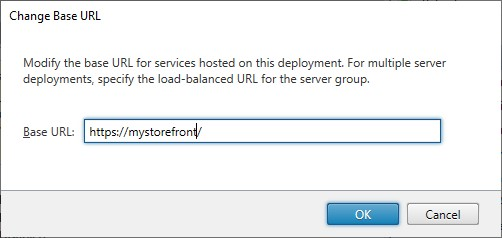
ベースURLは、展開でホストされるストアおよびその他のStoreFrontサービスのURLのルートとして使用されます。複数サーバー展開の場合は、ロードバランスされたURLを指定します。
ベースURLを変更するには:
- Citrix StoreFront管理コンソールの左ペインで、サーバーグループノードを選択します
- アクションペインで ベースURLの変更… をクリックします
- 新しいURLを入力します
- OK を押します
共有
共有
This Preview product documentation is Citrix Confidential.
You agree to hold this documentation confidential pursuant to the terms of your Citrix Beta/Tech Preview Agreement.
The development, release and timing of any features or functionality described in the Preview documentation remains at our sole discretion and are subject to change without notice or consultation.
The documentation is for informational purposes only and is not a commitment, promise or legal obligation to deliver any material, code or functionality and should not be relied upon in making Citrix product purchase decisions.
If you do not agree, select I DO NOT AGREE to exit.