This content has been machine translated dynamically.
Dieser Inhalt ist eine maschinelle Übersetzung, die dynamisch erstellt wurde. (Haftungsausschluss)
Cet article a été traduit automatiquement de manière dynamique. (Clause de non responsabilité)
Este artículo lo ha traducido una máquina de forma dinámica. (Aviso legal)
此内容已经过机器动态翻译。 放弃
このコンテンツは動的に機械翻訳されています。免責事項
이 콘텐츠는 동적으로 기계 번역되었습니다. 책임 부인
Este texto foi traduzido automaticamente. (Aviso legal)
Questo contenuto è stato tradotto dinamicamente con traduzione automatica.(Esclusione di responsabilità))
This article has been machine translated.
Dieser Artikel wurde maschinell übersetzt. (Haftungsausschluss)
Ce article a été traduit automatiquement. (Clause de non responsabilité)
Este artículo ha sido traducido automáticamente. (Aviso legal)
この記事は機械翻訳されています.免責事項
이 기사는 기계 번역되었습니다.책임 부인
Este artigo foi traduzido automaticamente.(Aviso legal)
这篇文章已经过机器翻译.放弃
Questo articolo è stato tradotto automaticamente.(Esclusione di responsabilità))
Translation failed!
構成
Citrix Virtual Apps and Desktops™ リリース 2503 以降では、サポートされている GPU を搭載した VDA で Intelligent Build to Lossless がデフォルトで有効になっています。これを有効にするためにポリシーを作成する必要はありません。この動作は、「ビデオコーデックを使用して圧縮する」ポリシーの状態によって制御されます。
Intelligent Build to Lossless を有効にする (デフォルトの動作)
「ビデオコーデックを使用して圧縮する」ポリシーを [未構成] のままにします。または、「ビデオコーデックを使用して圧縮する」ポリシーを明示的に [優先時に使用] に設定することもできます。
Intelligent Build to Lossless を無効にする (非推奨)
「ビデオコーデックを使用して圧縮する」ポリシーを明示的に「アクティブに変化する領域の場合」に設定します。
「アクティブに変化する領域の場合」を選択すると、Thinwire は、サーバー側 GPU を搭載した 2503 より前の VDA と同様に、選択的エンコーディングを使用します。
ステップバイステップの手順
Citrix Studio を使用して Intelligent Build to Lossless ポリシーを明示的に無効にするには、以下の手順に従ってください。
Citrix Studio (GUI)
- Citrix Studio を開きます。
- 左側のペインで、[ポリシー] に移動します。
- [ポリシーの作成] をクリックするか、ターゲットユーザーまたはデリバリーグループに適用される既存のポリシーを編集します。
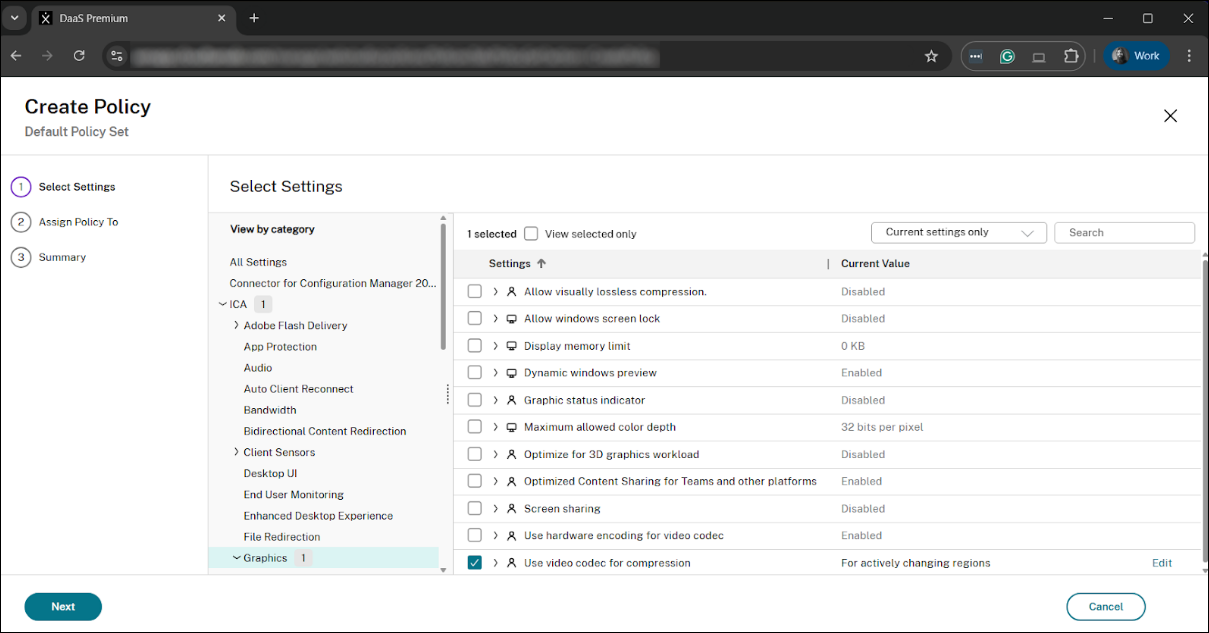
- ポリシー構成ウィンドウで、検索バーを使用して、[ICA®] > [グラフィック] カテゴリの下にある [ビデオコーデックを使用して圧縮する] ポリシーを見つけます。
- ポリシーを選択し、[編集] をクリックします。
- デフォルトでは、このポリシーは [優先時に使用] に設定されています。[デフォルト値を使用] オプションのチェックを外します。
- 値を「アクティブに変化する領域の場合」に変更します。
- [OK] をクリックしてポリシー設定を保存します。
-
ポリシーが有効になっており、正しく優先順位が付けられ、適切な [デリバリーグループ] またはユーザーフィルターに適用されていることを確認します。
注:
[視覚品質] ポリシーが明示的に「Build to Lossless」または「Always Lossless」に設定されている場合、これらの設定が常に優先され、新しい Intelligent Build to Lossless 機能が上書きされます。最良の結果を得るには、「視覚品質」ポリシーと「ビデオコーデックを使用して圧縮する」設定をデフォルト値のままにしてください。
共有
共有
This Preview product documentation is Citrix Confidential.
You agree to hold this documentation confidential pursuant to the terms of your Citrix Beta/Tech Preview Agreement.
The development, release and timing of any features or functionality described in the Preview documentation remains at our sole discretion and are subject to change without notice or consultation.
The documentation is for informational purposes only and is not a commitment, promise or legal obligation to deliver any material, code or functionality and should not be relied upon in making Citrix product purchase decisions.
If you do not agree, select I DO NOT AGREE to exit.