Security Considerations and Best Practices for running Citrix Unicon Scout
Security Considerations and Best Practices
Introduction
Threat Analysis
Modern IT systems face a range of security threats that often target communication paths between users and services. One major threat category includes man-in-the-middle attacks, in which an attacker secretly intercepts or manipulates communication between two parties. Such attacks can be carried out through techniques like network spoofing, ARP spoofing, the exploitation of unsecured networks, or by leveraging malware already present on a device.
Another significant threat involves backdoor and rootkit attacks, where attackers exploit hidden or poorly secured access points within a system. Once a backdoor is found or planted, a rootkit can be installed to gain persistent, unauthorized control over the system, making detection and removal difficult.
Closely related are viruses and Trojan horses, which typically rely on backdoors to infiltrate systems. Trojans disguise themselves as legitimate software, tricking users into installing them, while viruses spread across systems and networks. Social engineering, especially through deceptive emails, remains a common method for delivering these malicious programs to unsuspecting users.
Additionally, malware and ransomware pose a substantial risk. These programs are often installed intentionally by users or administrators who believe they are deploying legitimate tools. Hidden within them, however, is harmful code capable of encrypting data, disrupting operations, or opening additional attack pathways.
A further consequence of these attack types is data theft, a frequent outcome once a system is compromised. Stolen data may include sensitive corporate information, intellectual property, or personal data, and its exposure can significantly harm a company’s operations, reputation, and legal standing.
Security with eLux and Scout
Unicon’s secure operating system eLux and the corresponding management software Scout are designed to minimize the potential threats and their impact. The security architecture includes the following features:
1 eLux does not store any personal information or sensible information locally on a device. The system is kept read-only and only digitally signed software can be installed. This removes the risks for malware and ransomware, it also minimizes the possibility that a rootkit can be installed. 2 Enterprise communication offered by eLux uses state-of-the-art security measures to allow certificate based IEEE 802.1X network authorization. Certificates are stored in TPM chips on the eLux device. All internal network communication between Scout and eLux is secured by TLS. Users are warned when they connect to insecure networks. This mitigates the risk for man-in-the-middle attacks accordingly. 3 Rights management allows the Scout administrator to granularly adjust individual rights for the users of eLux devices. This can also include USB device handling. This reduces the chances of data theft by insider threats. 4 Applications and the eLux system are sandboxed and shielded to minimize the risk to security breaches and backdoor attacks. Additional sandbox features are available for all user applications and browser content. 5 eLux is a secure Linux system that adheres to Linux security standards. CVEs are patched and packages are updated accordingly when necessary as well as in regular updates. 6 Further security measures are also supported by eLux like smartcard authentication, running browser applications in an encapsulated kiosk mode and more.
Layers of Protection
Security in eLux is based on several layers of protection. Even if one defense is breached, the multitude of layers allow to protect the system.
| Security Layer | Advantages |
|---|---|
| Custom Linux kernel build with own kernel configuration | Only necessary drivers and components are enabled |
| Custom Linux kernel build with own kernel configuration | Unneeded code is not integrated, thus minimizing a possible attack vector |
| Secure network communication | Support of modern network security, IEEE 802.1X |
| Secure network communication | Encrypted communication with Scout to avoid man-in-the-middle attacks |
| Separation of privileged system access and unprivileged access | By default code will be executed unprivileged |
| Only a selected number of default components are installed | Components are hand selected from Ubuntu including Ubuntu backports of upstream security fixes |
| Only a selected number of default components are installed | Minimizing the number of packages, thus minimizing a possible attack vector |
| Read-only filesystem | Programs and processes cannot change, write or delete files |
| Read-only filesystem | Avoids unauthorized and unwanted changes |
| Encrypted filesystem | Content of filesystem cannot be retrieved with external tools |
| Encrypted filesystem | Key is secured in TPM chip that recognizes tampering with the system |
| Individual customer software images | Allows administrators to fine tune installed packages |
| Individual customer software images | Minimizing possible attack vectors to only keep the essential files |
| Installation of only signed packages | Possibility to only allow software packages from trusted sources |
| Installation of only signed packages | Avoid man-in-the-middle attacks |
| Regular security updates for the current release and long term support | secure packages, where security fixes were published |
| Additional security packages and features available | For scalable security, additional security components are available in the form of firewall, network access control, sandboxes and more |
| Secure login procedures include Active Directory, smart card, identity providers | Protection against unauthorized access |
| Granular user rights granted by administrators | Administrators can control the rights of users very detailed to mitigate insider threats |
| No personal data is stored | Personal data and login data is never stored on the device |
| No personal data is stored | No data can be lost or compromised by the theft or loss of a device |
Installation and Setup
Installation Scope
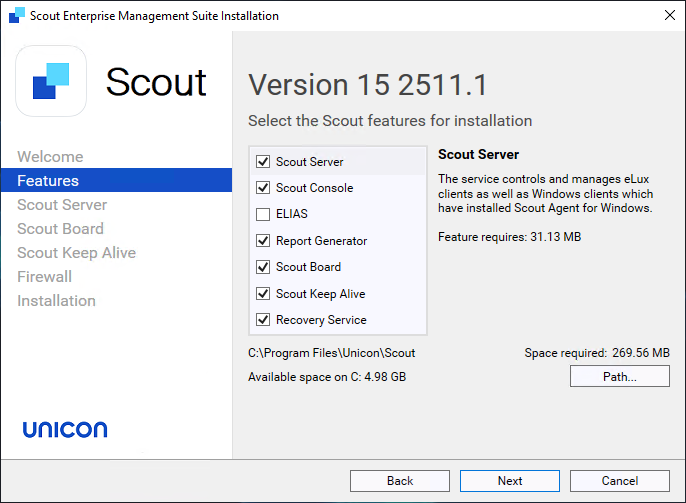
During the installation select User defined as installation scope. Only select the Scout features needed for your setup, unselect any features that are not necessary.
MS SQL Setup
Data at Rest
On the MS SQL setup ensure the encryption of the data at rest through Transparent Data Encryption (TDE). The performance impact through TDE should be neglectable for average and peak Scout database communication.
Transparent Data Encryption (TDE) encrypts the physical database files (MDF, NDF) and transaction logs (LDF) using AES or 3DES at the storage layer. This means the encryption happens on the server itself and is transparent to applications: data is encrypted before being written to disk and decrypted automatically when loaded into memory. Additionally, TDE protects backups, preventing offline attacks against copied database files or backup media. TDE uses a hierarchy of keys: a Database Encryption Key (DEK) stored in the database boot record, protected by either a server certificate or an asymmetric key stored in an external key store such as an HSM. This prevents an attacker who obtains database files from reconstructing the plaintext content.
Data in Transit
MS SQL Server protects data in transit using industry standard TLS (Transport Layer Security). When TLS is enabled for a SQL Server instance, all communication between clients and the server—queries, results, login credentials—is encrypted before transmission across the network. This prevents network level attackers from capturing or modifying data exchanged between endpoints. TLS requires installing a trusted certificate on the SQL Server host and configuring SQL Server Network Configuration to enforce encryption.
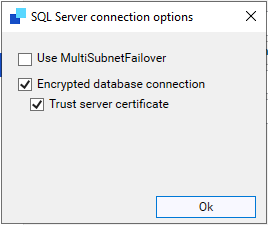
In the Scout installation select “Connection options…” and select “Encrypted database connection”.
Scout and eLux
Data at Rest
The eLux system partitions are already mounted read-only. By default disk encryption should always be turned. This is done by selecting the “Encryption FPM” in the BaseOS when configuring an eLux image. The key for the encryption will be stored safely in the TPM 2.0 chip. This ensures that all information stored on the device remains unreadable if the hardware is lost, stolen, or tampered with. TPM 2.0 provides a hardware-based root of trust, meaning the encryption keys are securely bound to the device and cannot be extracted or used elsewhere, which significantly raises the barrier for attackers.
Data in Transit
By default the data transfer between Scout and eLux is encrypted using at least TLS 1.2. To add additional trust the certificate should be verified when used. To ensure this, set the TLSVerifyOption according to the Scout Installation documentation, configure the correct trust level and certificates. TLS-encrypted communication is useful because it protects management traffic and device communication from interception, tampering, and impersonation. In the eLux and Scout environment, TLS ensures that configuration updates, commands, and status data exchanged between endpoints and the management server cannot be read or altered by unauthorized parties.
Connecting devices outside the corporate network should be done via a dedicated VPN setup to connect eLux with Scout or using the Scout Cloud Gateway (SCG). SCG establishes a built-in, certificate-based VPN tunnel for each endpoint, removing the need for traditional VPN solutions while still ensuring fully encrypted communication back to the Scout server. This allows remote, home-office, and mobile users to receive the same configurations, updates, and policies as on-premises devices with minimal user interaction. SCG also streamlines onboarding through automated authentication and certificate issuance.
Device Configuration
Network
Network settings rely on the given infrastructure. We recommend to set up eLux in an IEEE 802.1X network environment.
802.1X strengthens network security by ensuring that only authenticated and trusted devices can connect. Every connection attempt is validated before access is granted, which prevents unauthorized devices from joining the network and reduces the risk of internal threats. The protocol enables identity-based access control, enhances protection against malware and rogue devices, and supports a modern Zero Trust security approach. This results in a more secure, well-regulated, and resilient network environment across both wired and wireless infrastructures.
Restrict User Access
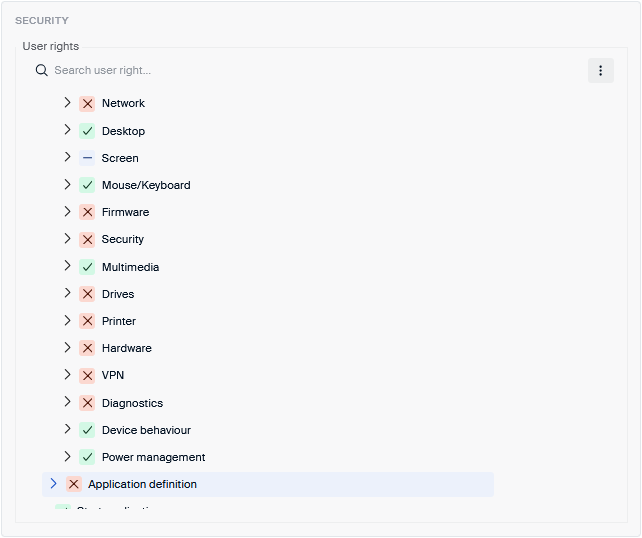
When configuring the device, in the Security tab the user rights need to be set. Restrict as much as possible to ensure that users do not tamper with any internal system settings. We recommend restricting at least the following settings, these settings need to be set by the administrator on Scout:
- Network
- Screen Advanced
- Firmware
- Security
- Drives
- Printer
- Hardware
- VPN
- Diagnostics
- Application definition
User Authentication
Users should authenticate when using an eLux device. eLux supports a range of authentications, however, also a web-based or VPN-based authentication for a customer setup could be sufficient. This depends on the use-case and the customer environment.
We recommend turning off “Show last user” when using one of the supported authentications on eLux. Showing the username of the last logged-in user is a security risk, especially on shared or publicly accessible systems. When eLux displays the last signed-in username, it gives an attacker half of the credentials needed to breach an account. This enables faster brute-force or targeted password-guessing attacks because the attacker no longer needs to guess the username.
Mirroring
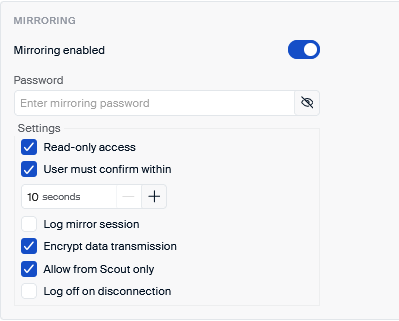
Mirroring is a powerful tool in any helpdesk scenario, allowing the administrator to have direct access to the eLux device. To reduce any risks from man-in-the-middle attacks and inside threats we recommend to:
- Only allow the administrator read access to the target machine
- Ask the user to confirm with the mirroring of his device
- Allow access only initiated by this Scout server
It is also highly recommended to use mirroring only from Scout Board instead of the Scout Console. This ensures the most secure, fully encrypted WebRTC connection. When using the Scout Console instead, ensure to set the password and encryption options additionally. Note that due to protocol restrictions, only the first 8 characters of the password are used, thus only granting weak further protection.
Kiosk Mode
When setting up a kiosk mode for eLux, e.g. when used in a public setting, ensure to turn off “Show last user” in the settings. Use the automatic log-off feature to ensure no open session can be hijacked easily.
For a browser kiosk mode, customize the browser to remove the navigation bar and print menu if possible.
Firmware
For firmware updates, use secure web servers with HTTPS configured and username and password set for additional security.
ELIAS allows the selection of feature packages (FPM) on a very granular level. This should be used to minimize the image size to reduce the possible attack surface. For each package check the FPM selection and only select FPMs that are needed by the user.
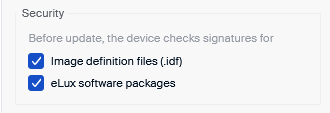
Do not install any packages from unknown origin. All packages by Unicon and Citrix are signed with the official private keys and can be checked with the included public certificates in ELIAS. This should be enforced by checking both the image file (IDF) and the packages for valid signatures.
Hardware
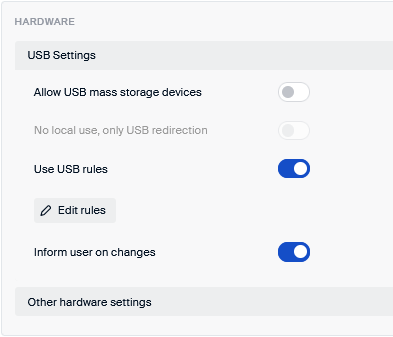
Restricting or disabling USB device access on eLux is a strong security measure because it prevents untrusted removable media from introducing malware, leaking data, or bypassing the system’s controlled and centrally managed environment. This makes it possible to enforce USB blocking or read-only policies, which reduces exposure to malware, data exfiltration, and unauthorized device use.
We recommend disabling the use of USB mass storage devices. Instead, define USB rules to allow or deny access to specific USB device classes.
Diagnostics
Diagnostics should be used for trouble-shooting issues on eLux systems. On production systems it should be turned off to avoid accumulating log and system data in the temporary folders.
Sandboxing Applications
With the additional Firejail package local eLux applications can be run in an additional sandbox. This can be highly useful on eLux because it adds an additional, configurable isolation layer that strengthens the system’s architecture. Firejail allows applications, especially browsers and other internet-facing tools, to run inside tightly restricted namespaces and profiles, limiting their access to the file system, network, and system resources. This containment helps prevent malicious web content or compromised applications from affecting the rest of the device, complements built-in browser sandboxing, and supports flexible security scenarios such as switching profiles when devices move between networks.
We recommend using Firejail for scenarios where the Built-in Browser is used in a mobile use-case often switching between safe and unsafe networks.
Administrator Permissions
Hardening administrative access in Scout is essential because the management server has complete control over all registered eLux endpoints, their firmware, configurations, certificates, policies, and operational behavior. A compromise of Scout administrator access would immediately translate into a compromise of the entire endpoint fleet. For that reason, administrator hardening must be approached with strict least-privilege design, identity assurance, and configuration governance.
Scout supports multi-admin deployments and granular permissions, which must be used to separate operational responsibilities. Only a minimal number of individuals should receive super-admin privileges, as these roles can modify global configuration, certificate handling, onboarding flows, and security-critical settings. Delegated administrators should instead be restricted to narrow functional scopes such as device group configuration, OU-specific adjustments, or image deployment. It is recommended to give delegated administrators only access to predefined firmware configurations, predefined commands and command templates.
Scout supports authentication via identity providers like Entra ID and Okta using OIDC or SAML. These must be used in place of local accounts, enabling MFA enforcement, conditional access, centralized password policy, and identity lifecycle management. Relying on enterprise identity providers ensures that administrator access remains tied to corporate identity systems rather than isolated credentials that may not be governed by enterprise policies.
Scout Preferences
Devices
Setting a secure device password is important. The device password is used as a last line of defense to prevent man-in-the-middle attacks. It also is used to secure command execution with system rights on eLux. Therefore, only the master administrator should know the device password, other administrators should only use predefined commands if they need to run commands with system rights.
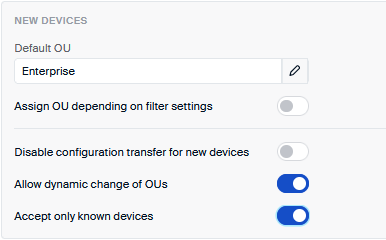
New devices should be sent to a quarantine OU with limited settings, e.g. no certificates, no applications. From there they can be moved to the right OU by the administrator. Only accepting only known devices further prevents malicious attacks where rogue eLux devices are connecting to Scout.
Predefined firmware configuration
Firmware updates for eLux and UEFI BIOS should be prepared by the master administrator. All other administrators should only be able to select from the list of predefined firmware updates. This prevents administrators to install untested or potential dangerous images, even if they have no malicious intent. This prevents administrators from deviating from hardened configurations, which could otherwise introduce vulnerabilities or weaken compliance. Firmware-level control also ensures that only validated OS versions, UEFI update processes, and secure package sets are used, reducing risk from untested images or misconfigurations; this aligns with the roadmap focus on secure firmware handling, logging improvements, and controlled image/firmware update workflows in Scout and Elias. Together, these restrictions ensure device integrity, prevent unauthorized or accidental downgrades or insecure configurations, and maintain a robust, enforceable security posture.
Predefined commands
Predefined commands as discussed above allow the master administrator to define a set of commands that other administrators can send to the devices even with system access. This prevents unauthorized, risky, or harmful actions from being executed on managed eLux endpoints. By limiting which remote commands an admin can send organizations minimize the risk of accidental misconfiguration, privilege misuse, or insider threats.
Command Templates
Command templates in Scout enhance security by tightly controlling how device-level actions can be executed, ensuring that administrators are limited to predefined, validated command structures rather than entering arbitrary or potentially harmful input. By providing centrally created command templates organizations ensure that only safe, vetted commands can be executed on devices, reducing the attack surface and ensuring consistent behavior across large deployments. This safeguards the environment from malformed parameters, enforces compliance with operational policies, and prevents delegated admins from performing unauthorized or risky low-level operations across the endpoint fleet.
Recovery Settings
We do not recommend to use PXE boot in general as it operates before security controls are active, uses historically insecure protocols (DHCP/TFTP), and is susceptible to rogue DHCP/TFTP servers, man-in-the-middle image manipulation, remote code execution vulnerabilities in UEFI PXE stacks and unauthorized image capture or injection. Use PXE boot only on trusted networks with strong security controls on the infrastructure level. However, when needed, PXE must only be used on trusted, isolated networks with strong security controls at the infrastructure level.