Imprivata Card and PIN Enrollment
Goal
Enable users to enroll additional authentication modalities (smart card and PIN) directly during login on eLux devices integrated with Imprivata. This ensures that unknown cards can be registered and required PINs can be set without separate administrative steps.
Feature Overview
eLux supports dynamic enrollment of the following Imprivata authentication modalities during login:
-
Card Enrollment
- When a user taps a smart card that is not yet registered in the Imprivata backend, the card can be enrolled during the login process.
-
PIN Enrollment
- If the PIN modality is configured in the Imprivata backend but no PIN has been enrolled yet, the user is required to enroll a PIN during login.
No additional client-side configuration is required in eLux.
Prerequisites
Before using card or PIN enrollment, ensure the following:
- eLux device is integrated with Imprivata.
- The Imprivata backend is reachable from the device.
- The user account exists in the Imprivata backend.
- For PIN enrollment:
- The PIN modality is enabled for the user in the Imprivata backend.
- For card enrollment:
- Card enrollment is allowed in the Imprivata backend configuration.
Authentication Flow with Enrollment
The following describes the authentication flow when both card and PIN enrollment are required:
- The user taps an unknown smart card.
- eLux detects that the card is not registered in the Imprivata backend.
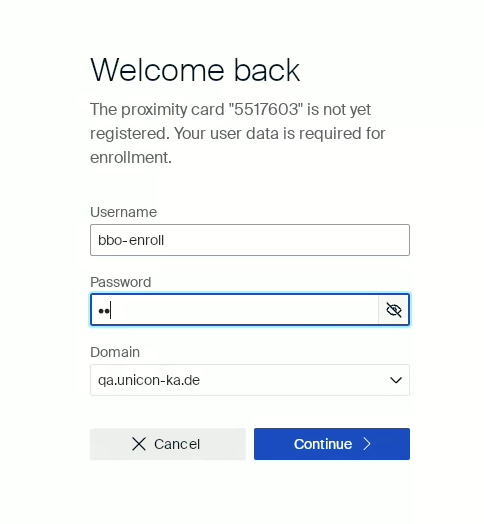
- The user is prompted to enroll the card.
- The user provides:
- Username
- Password
- Domain
- If credentials are valid, the card is enrolled and associated with the user account.
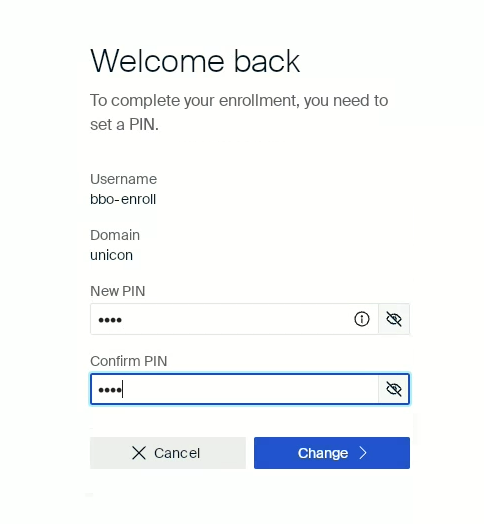
- If the backend requires PIN enrollment, the user is prompted to set a new PIN.
- After successful PIN enrollment, the user is logged in.
Example card enrollment UI:
Example pin enrollment UI:
Configuration
This section describes relevant configuration aspects on both eLux and the Imprivata backend.
eLux Configuration
No additional configuration parameters are required. The enrollment functionality is enabled by default and cannot be disabled on the client side.
Imprivata Backend Configuration
Card Enrollment
- Card enrollment must be permitted in the Imprivata backend.
-
If card enrollment is disabled:
- The eLux client displays an error message when an unknown card is tapped.
- Enrollment cannot proceed.
PIN Enrollment
- The PIN modality must be configured for the user.
-
If configured and no PIN is enrolled:
- The user is required to complete PIN enrollment before login.
-
If the PIN modality is not configured:
- The user is not prompted for PIN enrollment.
Known Limitations
- PIN enrollment is triggered immediately if:
- The PIN modality is configured in the Imprivata backend, and
- No PIN has been enrolled yet.
- This applies even if the user logs in using username and password instead of a smart card.
Example:
A user logs in with username and password. If the PIN modality is configured but no PIN exists yet, the user must enroll a PIN before access is granted.