NetScaler Console service use cases
Citrix Aidrien™ is your intelligent assistant designed to simplify and accelerate troubleshooting and environment analysis within your NetScaler infrastructure. Powered by deep integration with NetScaler infrastructure and telemetry, Citrix Aidrien understands your environment contextually, allowing it to surface relevant data, assist with diagnostics, and guide you through resolution steps using natural language queries.
Whether you’re investigating upgrade readiness, vulnerability assessment or reviewing instance resource utilization, Citrix Aidrien reduces the time spent navigating multiple consoles, correlating logs, and searching documentation by delivering insights directly within your workflow. Citrix Aidrien is available in Citrix Cloud™ across NetScaler Console Service, making it a seamless part of your daily operations.
NetScaler environment data
-
Software versions: Citrix Aidrien can list the software versions and build numbers installed on your NetScaler appliances. Monitoring is critical for identifying and patching NetScaler instances with known security vulnerabilities, ensuring compatible and supported versions across all appliances, especially in standalone, High Availability (HA), and cluster deployments. Here are a few examples:
- “How many of my NetScaler instances are running a build version earlier than 14.1-38.x?”
- “Which specific build versions are currently deployed across my NetScaler environment?”
-
Health and status: Monitor the operational status and health state (For example: Up, Down, out of service) of your NetScaler instances. This check provides immediate visibility for quick identification of issues, meeting SLAs, and initial troubleshooting. Here is an example:
- “How many NetScaler are currently in a ‘Down’ or ‘Out of Service’ state?”
-
Deployment modes: Understanding the deployment mode of the NetScaler instances (for example, Standalone, HA pair, Cluster) is fundamental for assessing redundancy, planning maintenance, understanding the traffic flow, gaining insight into the design, and scalability of your NetScaler infrastructure, and initial troubleshooting. Here are a few examples:
- “Which of my NetScaler appliances are deployed in HA mode or as part of a Cluster?”
- “Identify all NetScaler instances currently configured as the ‘Primary’ node within an HA pair.”
-
Enabled features: Lists the specific features currently activated or configured on your NetScaler appliances (for example, Load Balancing, WAF, GSLB). This list provides insight into functional capabilities, resource consumption, licensing compliance, and security posture, providing verifiable proof of enabled security and performance features for compliance audits. Here are a few examples:
- “What features are currently enabled on my NetScaler appliances?”
- “Which NetScaler instances have the Web Application Firewall (WAF) feature actively configured?”
- “List all instances where Global Server Load Balancing (GSLB) is currently deployed.”
-
Health metrics and capacity planning: Citrix Aidrien provides visibility into real-time and historical performance data to assist with capacity management and resource optimization. Some metrics include CPU, Memory, Disk Usage, HTTP Req/sec, RX, TX, SSL cards, and SSL Cores Up metrics. Here are a few examples:
- “What’s the CPU usage of my top NetScaler instances?”
- “Show HTTP request rate, throughput, and usage stats for instance 192.0.2.190.”
- “Are SSL cards and network interfaces enabled and functioning?”
- “Retrieve health statistics and usage data for my environment.”
-
Security advisory and vulnerability management: Citrix Aidrien integrates with NetScaler Console Security Advisory and CVE databases to identify, assess, and guide remediation of vulnerabilities affecting your NetScaler appliances. It can detect known CVEs applicable to deployed builds, provide remediation steps and references and highlight instances at risk due to outdated builds or configurations. Here are a few examples:
- “Is my instance 192.0.2.16 vulnerable to known security issues?”
- “List all NetScaler instances impacted by recent CVEs.”
- “Show remediation guidance for identified vulnerabilities.”
-
SSL certificate health and SSL configuration visibility
Citrix Aidrien provides deep visibility into SSL certificate inventory and SSL/TLS configuration across all managed NetScaler instances.
This feature enables certificate lifecycle management, stronger security posture, and reduced risk of service disruptions caused by certificate expiration or weak cryptographic configurations.
The capabilities include complete certificate inventory and usage across instances, instance and virtual server bindings, certificate-to-application mapping, expiry monitoring and risk indicators, expiring-soon alerts, risk-based visibility of certificates nearing expiration, centralized expiry tracking, cryptographic strength key size validation, signature algorithm identification, issuer and trust-chain visibility, detection of weak or deprecated cryptographic standards, SSL/TLS Configuration Assessment, SSL/TLS protocol usage, cipher suite, and key-exchange visibility, SSL feature enablement across instances.
Example prompts:
- “Show all SSL certificates expiring within the next 30 days.”
- “Which certificates are using SHA-1 signatures?”
- “List certificates bound to virtual servers on instance 192.0.2.13.”
- “Are any instances using deprecated SSL/TLS protocols?”
- “Provide SSL key size and issuer details for my environment.”
This use case helps administrators avoid outages, ensure compliance, and maintain strong encryption standards.
Specialized use cases
Citrix Aidrien goes beyond surface-level diagnostics by offering deep, contextual troubleshooting through special-purpose sub-agents. These agents are designed to extend Citrix Aidrien’s intelligence beyond data retrieval to automation, validation, and guided execution.
NetScaler upgrade assistant
The NetScaler Upgrade Assistant is a specialized Citrix Aidrien sub-agent designed to assist administrators with upgrade readiness and orchestration. Unlike contextual queries, this workflow uses dedicated upgrade utilities and validation tools to perform environment assessments and guided upgrade preparation.
Here’s how Citrix Aidrien transforms these workflows:
Upgrade readiness and planning
- Detects NetScaler instances running EOL/EOM or latest/non-recommended builds.
- Maps build versions to known CVEs and recommends upgrade paths.
- Performs pre-upgrade validation (checks customizations, configurations, dependencies, and health).
- Identifies blocking issues with detailed resolution guidance.
- Provides a readiness summary and directs users to initiate the upgrade from NetScaler Console.
Upgrade scheduling
Citrix Aidrien enables administrators to schedule NetScaler upgrades through a guided workflow within NetScaler Console. When an upgrade is requested for a specific instance, Citrix Aidrien evaluates the current build, security posture, and overall compatibility, recommends an appropriate target build, and performs readiness validation before scheduling. Administrators might proceed with the Citrix Aidrien recommended build or explicitly select an alternate target build version.
Upgrades are scheduled by specifying a maintenance window in UTC, after which Citrix Aidrien automatically creates the upgrade job using the default configuration settings.
Following the readiness confirmation, the workflow includes:
- Confirmation of upgrade intent
- Automated pre-upgrade validation checks
- Configuration of the upgrade schedule
- Redirection to run the upgrade within NetScaler Console
This streamlined process ensures a controlled, validated, and auditable upgrade lifecycle.
Example prompts:
- “Schedule upgrade for instance 192.0.2.16 this Saturday at 23:00 UTC.”
Build comparison analysis
-
Full build comparison
The capabilities include comparison between two releases or builds, clearly articulating fixed issues and enhancements between the source and target builds, and listing known issues in the target build.
Example prompts:
- “Compare build 14.1–47.48 & 14.1–60.52”
- “What security fixes are included in the latest recommended build?”
-
Instance level build comparison analysis
Based on enabled features and configuration of your NetScaler instance, Citrix Aidrien provides a contextualized analysis of release notes. The capabilities include comparison between two releases or builds clearly articulating fixed issues and enhancements between the source and target builds, and listing known issues in the target build. Citrix Aidrien will generate a downloadable environment-specific release note summary.
Example queries:
- “Perform release notes analysis for instance 192.0.2.16.”
Contextual dashboard intelligence (“Analyze with Citrix Aidrien”)
Citrix Aidrien provides predefined contextual insights directly within key dashboards in NetScaler Console service. These contextual responses reduce analysis time by providing pre-populated summaries tailored to the dashboard view, eliminating the need for manual filtering and correlation.
When administrators click Analyze with Citrix Aidrien, they receive intelligent summaries specific to that dashboard scope.
Supported Dashboards
-
Instance Inventory Dashboard
-
Analyze the health stats, features enabled, and security advisory details of a specific NetScaler/Citrix ADC instance selected.
-
Select an instance and click “Analyze with Citrix Aidrien” to get the instance advisory.

-
-
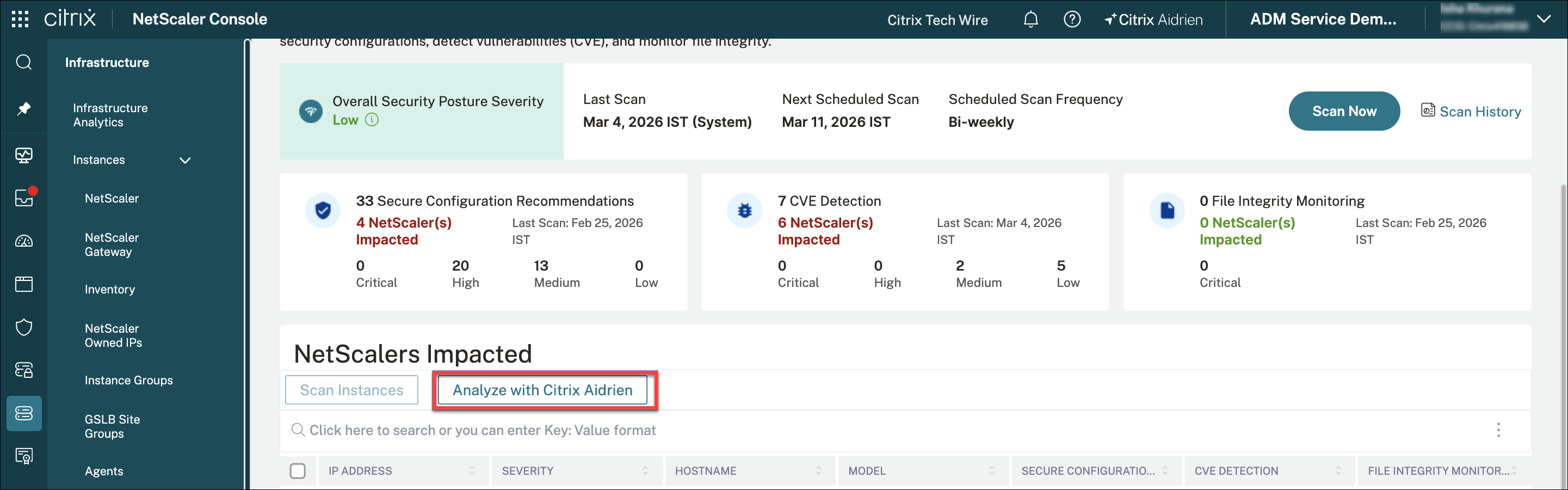
Security Dashboard
- Analyze the security recommendations and CVE exposure summary for all or specific NetScaler instances.
- Select an instance and click “Analyze with Citrix Aidrien” to get security advisory for the selected instance.
- Click “Analyze with Citrix Aidrien” without selecting an instance to get the security advisory for all NetScaler instances.
-
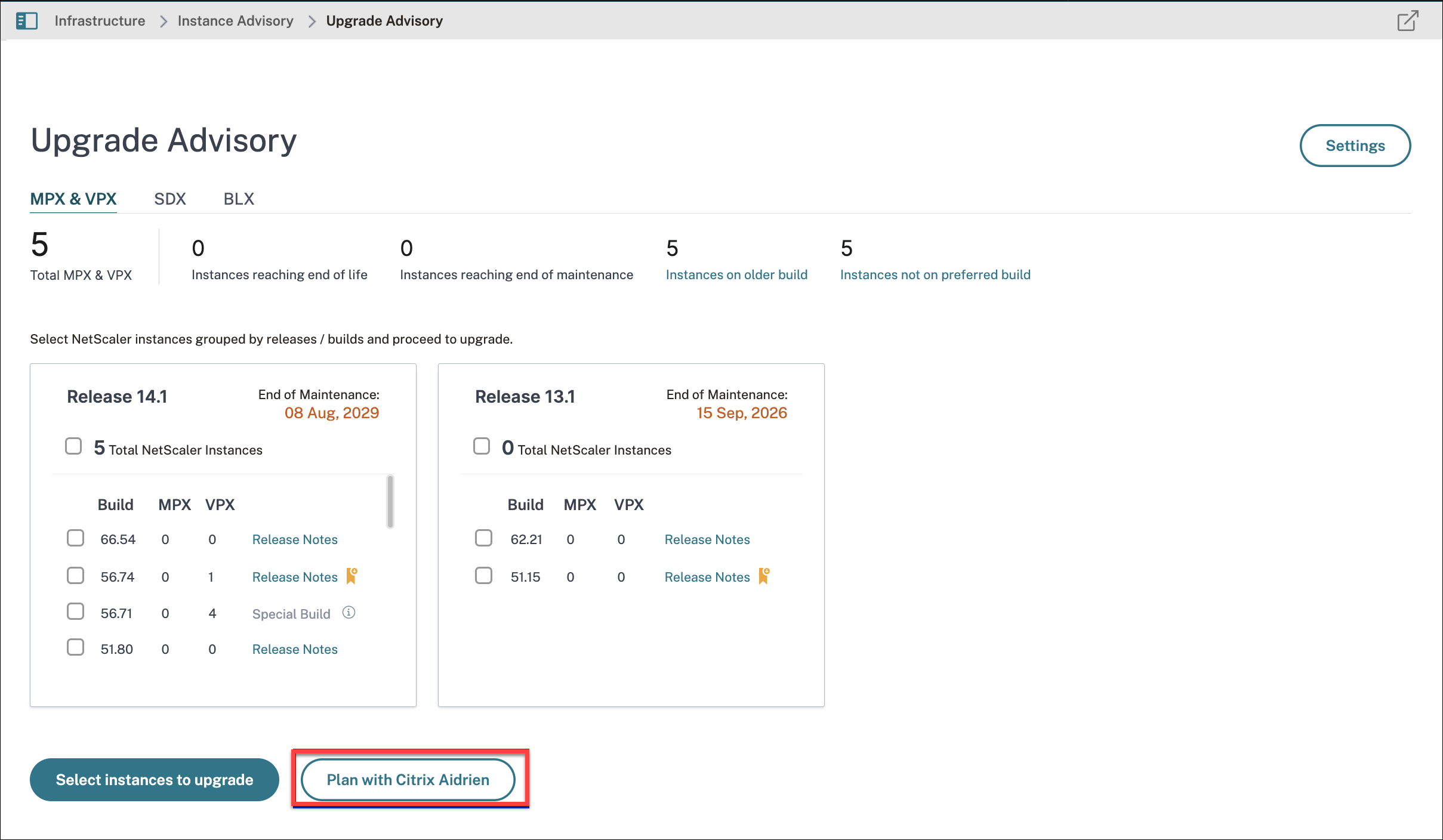
Upgrade Advisory Dashboard
-
Analyze the NetScaler inventory, CVE remediation mapping, readiness summary, upgrade path, and upgrade scheduling.
-
Click Plan with Citrix Aidrien to get the upgrade advisory for all NetScaler instances.
-